| Type: | Package |
| Title: | Store and Transfer Amplicon Sequence Data |
| Version: | 0.1.4 |
| Date: | 2026-10-16 |
| Maintainer: | Pat Schloss <pschloss@umich.edu> |
| Description: | Stores the data associated with your amplicon sequence analysis. This includes nucleotide sequences, abundance, sample and treatment assignments, taxonomic classifications, asv, otu and phylotype clusters, metadata, trees and various reports. It is designed to facilitate data analysis across multiple R packages with utility functions to read / write from 'mothur', 'qiime2', 'dada2', and 'phyloseq'. |
| URL: | https://github.com/mothur/strollur, https://mothur.org/strollur/ |
| BugReports: | https://github.com/mothur/strollur/issues |
| License: | GPL (≥ 3) |
| Imports: | Rcpp, cli, methods, microseq, R.utils, R6, waldo, readr, ape, dplyr, tidyr, yaml, rbiom (≥ 3.1.0), stats, utils |
| LinkingTo: | Rcpp, cli, Rcereal |
| Depends: | R (≥ 4.2.0) |
| Suggests: | knitr, rmarkdown, testthat (≥ 3.0.0), xml2, phyloseq, ggplot2, phylotypr, rhdf5, h5lite, pak |
| Config/testthat/edition: | 3 |
| Encoding: | UTF-8 |
| VignetteBuilder: | knitr |
| Config/roxygen2/version: | 8.1.0 |
| NeedsCompilation: | yes |
| Packaged: | 2026-10-16 17:34:22 UTC; swestcot |
| Author: | Sarah Westcott  [aut],
Gregory Johnson
[aut],
Pat Schloss [cph,
cre]
[aut],
Gregory Johnson
[aut],
Pat Schloss [cph,
cre] |
| Repository: | CRAN |
| Date/Publication: | 2026-10-19 13:10:02 UTC |
strollur: Store and Transfer Amplicon Sequence Data
Description
Stores the data associated with your amplicon sequence analysis. This includes nucleotide sequences, abundance, sample and treatment assignments, taxonomic classifications, asv, otu and phylotype clusters, metadata, trees and various reports. It is designed to facilitate data analysis across multiple R packages with utility functions to read / write from 'mothur', 'qiime2', 'dada2', and 'phyloseq'.
Author(s)
Maintainer: Pat Schloss pschloss@umich.edu (ORCID) [copyright holder]
Authors:
Sarah Westcott swestcot@umich.edu (ORCID)
Gregory Johnson grejoh@umich.edu (ORCID)
See Also
Useful links:
Report bugs at https://github.com/mothur/strollur/issues
Get the abundance data for sequences, bins, samples, and treatments in a strollur object
Description
Get the abundance data for sequences, bins, samples, and treatments in a strollur object
Usage
abundance(data, type = "sequence", bin_type = "otu", by_sample = FALSE)
Arguments
data |
|
type |
string containing the type of data you want the number of. Options include: "sequence", "bin", "sample" and "treatment". Default = "sequence". |
bin_type |
string containing the bin type you would like the abundance data for. Default = "otu". |
by_sample |
Boolean. When by_sample is TRUE, the abundance data will be parsed by sample. Default = FALSE. |
Value
data.frame
Examples
miseq <- strollur::miseq_sop_example()

# To the total abundance for each sequence
strollur::abundance(data = miseq, type = "sequence")

# To the total abundance for each sequence parsed by sample
strollur::abundance(data = miseq, type = "sequence", by_sample = TRUE)

# To the total abundance for each "otu" bin
strollur::abundance(data = miseq, type = "bin", bin_type = "otu")

# To the total abundance for each "otu" bin parsed by sample
strollur::abundance(data = miseq, type = "bin",
                     bin_type = "otu", by_sample = TRUE)

# To the total abundance for each "asv" bin
strollur::abundance(data = miseq, type = "bin", bin_type = "asv")

# To the total abundance for each "asv" bin parsed by sample
strollur::abundance(data = miseq, type = "bin",
                     bin_type = "asv", by_sample = TRUE)

# To the total abundance for each sample
strollur::abundance(data = miseq, type = "sample")

# To the total abundance for each treatment
strollur::abundance(data = miseq, type = "treatment")
Add sequences, reports, trees or resource references to a strollur object
Description
Add sequences, reports, trees or resource references to a strollur object
Usage
add(
  data,
  table,
  type = "sequence",
  report_type = NULL,
  table_names = list(sequence_name = "sequence_name", sequence = "sequence", comment =
    "comment", quality_score = "quality_score", reference_vendor = "vendor",
    reference_name = "name", reference_version = "version", reference_usage = "usage",
    reference_note = "note", reference_method_url = "method_url",
    reference_documentation_url = "documentation_url", reference_parameter = "parameter",
    reference_citation = "citation"),
  reference = NULL,
  verbose = TRUE
)
Arguments
data |
|
table |
a data.frame or tree containing the data you wish to add. |
type |
a string containing the type of data. Options include:
|
report_type |
a string containing the type of report you are adding. |
table_names |
named list used to indicate the names of the columns in the table. By default: table_names <- list(sequence_name = "sequence_name", comment = "comment", sequence = "sequence", quality_score = "quality_score", reference_name = "name", reference_vendor = "vendor", reference_version = "version", reference_usage = "usage", reference_note = "note", reference_documentation_url = "documentation_url", reference_method_url = "method_url", reference_parameter = "parameter", reference_citation = "citation") In table_names, 'sequence_name' is a string containing the name of the column in 'table' that contains the sequence names. It is used when you are adding FASTA data. Default column name is 'sequence_name'. In table_names, 'sequence' is a string containing the name of the column in 'table' that contains the sequence nucleotide strings. It is used when you are adding FASTA data. Default column name is 'sequence'. In table_names, 'comment' is a string containing the name of the column in 'table' that contains the sequence comments. It is used when you are adding FASTA data. Default column name is 'comment'. In table_names, 'quality_score' is a string containing the name of the column in 'table' that contains the sequence quality scores. It is used when you are adding FASTQ data. Default column name is 'quality_score'. In table_names, 'reference_vendor' is a string containing the name of the column in 'table' that contains the reference vendor names. It is used when you are adding reference data. Default column name is 'vendor'. In table_names, 'reference_name' is a string containing the name of the column in 'table' that contains the reference names. It is used when you are adding reference data. Default column name is 'name'. In table_names, 'reference_version' is a string containing the name of the column in 'table' that contains the reference versions. Default column name is 'version'. In table_names, 'reference_usage' is a string containing the name of the column in 'table' that contains the reference usages. Default column name is 'usage'. In table_names, 'reference_note' is a string containing the name of the column in 'table' that contains the reference notes. Default column name is 'note'. In table_names, 'reference_method_url' is a string containing the name of the column in 'table' that contains the reference method urls. Default column name is 'method_url'. In table_names, 'reference_documentation_url' is a string containing the name of the column in 'table' that contains the reference urls. Default column name is 'documentation_url'. In table_names, 'reference_parameter' is a string containing the name of the column in 'table' that contains the reference parameters. Default column name is 'parameter'. In table_names, 'reference_citation' is a string containing the name of the column in 'table' that contains the reference citations. Default column name is 'citation'. |
reference |
a list created by the function new_reference. Optional. |
verbose |
boolean indicating whether or not you want progress messages. Default = TRUE. |
Value
an updated strollur object
Examples
# Create a new empty strollur object named 'example_dataset'
data <- strollur::new_dataset(dataset_name = "example_dataset")

# Read FASTA data into data.frame
fasta_data <-
  strollur::read_fasta(fasta = strollur_example("final.fasta.gz"))

# Add FASTA sequence data
strollur::add(data = data, table = fasta_data, type = "sequence")

# To add FASTA data with a resource reference

# Create a new empty strollur object named 'example_dataset'
data <- strollur::new_dataset(dataset_name = "example_dataset")

# Create a resource reference for the FASTA data silva_resource <-
silva_resource <- strollur::new_reference(
  vendor = "SILVA", name =
    "silva.bacteria.fasta", version = "1.38.1",
  usage = "alignment of sequences",
  note = "reference trimmed to V4 region", method_url =
    "https://mothur.org/blog/2024/SILVA-v138_2-reference-files/",
  documentation_url = "https://mothur.org/wiki/silva_reference_files/"
)

# Add FASTA data with a resource reference

strollur::add(
  data,
  table = fasta_data,
  type = "sequence",
  reference = silva_resource
)

# Create a new empty strollur object named 'example_dataset'
data <- strollur::new_dataset(dataset_name = "example_dataset")

# Read FASTQ data into data.frame
fastq_data <-
  strollur::read_fastq(fastq = strollur_example("tiny.fastq.gz"))

# Add FASTQ sequence data
strollur::add(data = data, table = fastq_data, type = "fastq")

# Add contigs assembly report with a 'sequence_name' column named 'Name'

contigs_report <- readRDS(strollur_example("miseq_contigs_report.rds"))

strollur::add(
  data,
  table = contigs_report, type = "report",
  report_type = "contigs_report", list(sequence_name = "Name")
)

# To add metadata related to your study

metadata <- readRDS(strollur_example("miseq_metadata.rds"))

strollur::add(data,
  table = metadata,
  type = "report", report_type = "metadata"
)

# To add a tree relating to your sequences

tree <- ape::read.tree(strollur_example("final.phylip.tre.gz"))

strollur::add(data, table = tree, type = "sequence_tree")

# To add a tree relating to your samples
data <- strollur::new_dataset(dataset_name = "example_dataset")

df <- strollur::read_mothur_shared(strollur_example("final.opti_mcc.shared"))
tree <- ape::read.tree(strollur_example("final.opti_mcc.jclass.ave.tre"))

strollur::assign(data, table = df, type = "bin", bin_type = "otu")
strollur::add(data, table = tree, type = "sample_tree")
Assign sequence abundances, sequence classifications, bins, bin representative sequences, bin classifications, sample distances or treatments to a strollur object
Description
Assign sequence abundances, sequence classifications, bins, bin representative sequences, bin classifications, sample distances or treatments to a strollur object
Usage
assign(
  data,
  table,
  type = "bin",
  bin_type = "otu",
  table_names = list(sequence_name = "sequence_name", quality_score = "quality_score",
    abundance = "abundance", sample = "sample", treatment = "treatment", taxonomy =
    "taxonomy", level = "level", confidence = "confidence", bin_name = "bin_name"),
  reference = NULL,
  verbose = TRUE
)
Arguments
data |
|
table |
a data.frame containing the data you wish to assign |
type |
a string containing the type of data. Options include:
|
bin_type |
string containing the bin type you would like the number of
bins for. Default = |
table_names |
named list used to indicate the names of the columns in the table. By default: table_names <- list(sequence_name = "sequence_name", quality_score = "quality_score", abundance = "abundance", sample = "sample", treatment = "treatment", taxonomy = "taxonomy", level = "level", confidence = "confidence", bin_name = "bin_name") In table_names, In table_names, In table_names, In table_names, In table_names, In table_names, In table_names, In table_names, In table_names, |
reference |
a list created by the function new_reference. Optional. |
verbose |
boolean indicating whether or not you want progress messages. Default = TRUE. |
Value
an updated strollur object
See Also
Examples
# Assign sequence classifications

# create a new empty strollur object named 'example_dataset'
data <- strollur::new_dataset(dataset_name = "example_dataset")

sequence_classifications <- strollur::read_mothur_taxonomy(strollur_example(
  "final.taxonomy.gz"
))

strollur::assign(
  data,
  table = sequence_classifications, type = "sequence_taxonomy"
)

# Assigning bins

# read mothur's otu list file into data.frame
otu_data <- strollur::read_mothur_list(list = strollur_example(
  "final.opti_mcc.list.gz"
))

# read mothur's asv list file into data.frame
asv_data <- strollur::read_mothur_list(list = strollur_example(
  "final.asv.list.gz"
))

# read mothur's phylotype list file into data.frame
phylo_data <- strollur::read_mothur_list(list = strollur_example(
  "final.tx.list.gz"
))

# read otu bin representative sequences into a data.frame
bin_reps <- readRDS(strollur_example("miseq_representative_sequences.rds"))

# assign 'otu' bins using sequence names
strollur::assign(data, table = otu_data, bin_type = "otu")

# assign 'asv' bins using sequence names
strollur::assign(data, table = asv_data, bin_type = "asv")

# assign 'phylotype' bins using sequence names
strollur::assign(data, table = phylo_data, bin_type = "phylotype")

# assign 'otu' bin representative sequences
strollur::assign(data, table = bin_reps, type = "bin_representative")

# To assign abundance only bins

# create a new empty strollur object named 'example_dataset'
data <- strollur::new_dataset(dataset_name = "example_dataset")

# read mothur's shared file
otu_data <-
  strollur::read_mothur_shared(strollur_example("final.opti_mcc.shared"))

# assign abundance only otus parsed by sample
strollur::assign(data, table = otu_data, bin_type = "otu")

# Assigning bin classifications

# read bin taxonomies
otu_data <- strollur::read_mothur_cons_taxonomy(strollur_example(
  "final.cons.taxonomy"
))

# assign otu consensus taxonomies
strollur::assign(
  data,
  table = otu_data,
  type = "bin_taxonomy", bin_type = "otu"
)

# Assign treatments

sample_assignments <- readRDS(strollur_example("miseq_sample_design.rds"))

strollur::assign(data, table = sample_assignments, type = "treatment")

# Assign sample distances

dist_file <- strollur_example("final.opti_mcc.jclass.0.03.column.dist")
sample_dists <- readr::read_table(dist_file,
  col_names = FALSE,
  show_col_types = FALSE
)
strollur::assign(data, table = sample_dists, type = "sample_distance")
Clear data from a strollur object
Description
Clear data from a strollur object
Usage
clear(data)
Arguments
data |
Value
an updated strollur object
Examples
data <- miseq_sop_example()
clear(data)
Create a new strollur object from an existing dataset.
Description
Create a new strollur object from an existing dataset.
Usage
copy_dataset(data)
Arguments
data |
Value
See Also
The 'new' method in the strollur object
Examples
miseq <- strollur::miseq_sop_example()

# to create a new dataset that is a copy of miseq

data <- strollur::copy_dataset(miseq)
Find the number of sequences, samples, treatments or bins of a given type in a strollur object
Description
Find the number of sequences, samples, treatments or bins of a given type in a strollur object
Usage
count(
  data,
  type = "sequence",
  bin_type = "otu",
  samples = NULL,
  distinct = FALSE
)
Arguments
data |
|
type |
string containing the type of data you want the number of. Options include: "sequence", "sample", "treatment", "bin", and "resource_reference". Default = "sequence". |
bin_type |
string containing the bin type you would like the number of bins for. Default = "otu". |
samples |
vector of strings. samples is only used when 'type' = "sequence" or 'type' = "bin" . samples should contain the names of the samples you want the count for. Default = NULL. |
distinct |
Boolean. distinct is used when 'type' = "sequence" or 'type' = "bin". When 'type' = "sequence" and distinct is TRUE the number of unique sequences is returned. When 'type' = "sequence" and distinct is FALSE the total number of sequences is returned. This can also be combined with samples to find the number of unique sequences found ONLY in a given set of samples, or to find the number of unique sequences in given set of samples that may also be present in other samples. When 'type' = "bin", you can set distinct = TRUE to return the number of bins that ONLY contain sequences from the given samples. When distinct is FALSE the count returned contains bins with sequences from a given samples, but those bins may also contain other samples. Default = FALSE. |
Value
double
Examples
miseq <- strollur::miseq_sop_example()

# To get the total number of sequences
strollur::count(data = miseq, type = "sequence")

# To get number of unique sequences
strollur::count(data = miseq, type = "sequence", distinct = TRUE)

# To get number of unique sequences from samples 'F3D0' and 'F3D1'
# Note these sequences will be present in both samples but may be
# be present in other samples as well
strollur::count(data = miseq, type = "sequence", samples = c("F3D0", "F3D1"))

# To get number of unique sequences exclusive to samples 'F3D0' and 'F3D1'
# Note sequences are present in both samples and NOT present in any other
# samples.
strollur::count(
  data = miseq, type = "sequence", samples = c("F3D0", "F3D1"),
  distinct = TRUE
)

# To get the number of samples in the dataset
strollur::count(data = miseq, type = "sample")

# To get the number of treatments in the dataset
strollur::count(data = miseq, type = "treatment")

# To get the number of "otu" bins in the dataset
strollur::count(data = miseq, type = "bin", bin_type = "otu")

# To get the number of "asv" bins in the dataset
strollur::count(data = miseq, type = "bin", bin_type = "asv")

# To get the number of "phylotype" bins in the dataset
strollur::count(data = miseq, type = "bin", bin_type = "phylotype")

# To get number of "otu" bins from samples 'F3D0' and 'F3D1'
# Note these bins will have sequences from both samples but there may be
# other samples present as well
strollur::count(
  data = miseq,
  type = "bin", bin_type = "otu", samples = c("F3D0", "F3D1")
)

# To get number of "otu" bins unique to samples 'F3D0' and 'F3D1'
# Note these bins will have sequences from both samples and NO other samples
# will be present in the bins.
strollur::count(
  data = miseq, type = "bin", bin_type = "otu",
  samples = c("F3D0", "F3D1"), distinct = TRUE
)
Create a human readable table containing all data from a strollur object.
Description
Export all data from a strollur object.
Usage
export_dataset(data)
Arguments
data |
Value
list, containing the data in the strollur::strollur object
Examples
dataset <- strollur::new_dataset("my_dataset")
strollur::export_dataset(dataset)
Get bin table types of a strollur object
Description
Get bin table types of a strollur object
Usage
get_bin_types(data)
Arguments
data |
Value
vector of strings
Examples
data <- miseq_sop_example()
get_bin_types(data)
Determine if a given sample is in a strollur object
Description
Determine if a given sample is in a strollur object
Usage
has_sample(data, sample)
Arguments
data |
|
sample |
a string containing the name of a sample. |
Value
boolean indicating whether the dataset has a given sample
Examples
data <- miseq_sop_example()
has_sample(data, "F3D0")
has_sample(data, "not a valid sample")
Determine if a strollur object contains sequence nucleotide strings.
Description
Determine if a strollur object contains sequence nucleotide strings.
Usage
has_sequence_strings(data)
Arguments
data |
Value
boolean indicating whether the dataset has sequence nucleotide strings.
Examples
data <- miseq_sop_example()
has_sequence_strings(data)
Create a strollur object from the exported table of a strollur object
Description
The import_dataset function will create a strollur object from the exported table of a strollur object object.
Usage
import_dataset(table)
Arguments
table |
a table containing the data from a
strollur
object. You can create the table using |
Value
See Also
Examples
miseq <- strollur::miseq_sop_example()
data <- strollur::import_dataset(strollur::export_dataset(miseq))
data
Determine if a strollur object contains aligned sequences.
Description
Determine if a strollur object contains aligned sequences.
Usage
is_aligned(data)
Arguments
data |
Value
Boolean
Examples
dataset <- miseq_sop_example()
is_aligned(dataset)
Determine if two strollur objects are equal.
Description
Determine if two strollur objects are equal.
Usage
is_equal(data, data2)
Arguments
data |
|
data2 |
Value
a logical
Examples
miseq <- strollur::miseq_sop_example()

data <- strollur::copy_dataset(miseq)

strollur::is_equal(miseq, data)
Load a strollur object from a file.
Description
The load_dataset function will create a strollur object from an RDS file.
Usage
load_dataset(file)
Arguments
file |
a string containing the .rds file name. |
Value
See Also
Examples
data <- strollur::load_dataset(strollur_example("miseq_sop.rds"))
data
Create a strollur object using the analysis files from the MiSeq_SOP example.
Description
The miseq_sop_example function will create strollur object using the analysis files from the MiSeq_SOP example.
Usage
miseq_sop_example()
Value
A strollur::strollur object
Examples
miseq <- strollur::miseq_sop_example()
Get the names of various data in a strollur object
Description
Get the names of names sequences, bins, samples, treatments, and reports data in a strollur object
Usage
names(
  data,
  type = "sequence",
  bin_type = "otu",
  samples = NULL,
  distinct = FALSE
)
Arguments
data |
|
type |
string containing the type of data you would like. Options include: "dataset", "sequence", "bin", "sample", "treatment", "report". Default = "sequence". |
bin_type |
string containing the bin type you would like the names for. Default = "otu". |
samples |
vector of strings. samples is only used when 'type' = "sequence" or 'type' = "bin" . samples should contain the names of the samples you want names for. Default = NULL. |
distinct |
logical. distinct is used when |
Value
vector of strings, containing the names requested
Examples
miseq <- strollur::miseq_sop_example()

# To get the name of the dataset
strollur::names(data = miseq, type = "dataset")

# To get the names of the sequences
strollur::names(data = miseq, type = "sequence")

# To get the names of the sequences present sample 'F3D0'
strollur::names(data = miseq, type = "sequence", samples = c("F3D0"))

#' # To get the names of the sequences unique to sample 'F3D0'
strollur::names(data = miseq, type = "sequence",
                samples = c("F3D0"), distinct = TRUE)

# To get the names of the samples
strollur::names(data = miseq, type = "sample")

# To get the names of the treatments
strollur::names(data = miseq, type = "treatment")

# To get the names of the bins
strollur::names(data = miseq, type = "bin")

# To get the names of the bins that are unique to 'F3D0'
strollur::names(data = miseq, type = "bin",
                samples = c("F3D0"), distinct = TRUE)

# To get the names of the bins that include sequences from 'F3D0'
strollur::names(data = miseq, type = "bin",
                samples = c("F3D0"), distinct = FALSE)

# To get the names of the reports
strollur::names(data = miseq, type = "report")
Create a new strollur object
Description
Create a new strollur object
Usage
new_dataset(dataset_name = "")
Arguments
dataset_name |
string, a string containing the dataset name. Default = "" |
Value
See Also
The 'new' method in the strollur object
Examples
data <- strollur::new_dataset()

# to create a new dataset named "soil", run the following:

data <- strollur::new_dataset(dataset_name = "soil")
Create a resource reference for your strollur object to aid in reproducibility.
Description
Create a resource reference for your strollur object to aid in reproducibility.
Usage
new_reference(
  name,
  vendor = "",
  version = "",
  usage = "",
  note = "",
  documentation_url = "",
  method_url = "",
  parameter = "",
  citation = ""
)
Arguments
name |
a string containing the name of the resource used. For example: 'silva.bacteria.fasta' or 'R package phylotypr'. |
vendor |
a string containing name of entity that created original resource. example: "Silva" or "Schloss Lab - University of Michigan" |
version |
a string containing the version of the reference resource. For example: '1.38.1' or '0.1.1'. Default = "". |
usage |
a string containing the usage of the resource reference in your analysis. For example: 'alignment of sequences' or 'classification of sequences'. Default = "". |
note |
a string containing additional notes about the resource reference in your analysis. For example: 'alignment reference trimmed to V4 region' or 'classification of sequences using Bayesian method'. Default = "". |
documentation_url |
a string containing a web address where the reference may be downloaded or documentation may be found. Default = "". |
method_url |
a string containing any publications describing the methods used by the resource reference. For example: 'doi:10.1128/mra.01144-24'. Default = "". |
parameter |
a string containing the any specific parameters used by the resource. For example: 'kmer_size = 8, num_bootstraps = 100, min_confidence = 80' Default = "". |
citation |
a string containing the citation information for the resource reference. For example: "citation_key = "doi:10.1128/AEM.00062-07", author = "Qiong Wang and George M. Garrity and James M. Tiedje and James R. Cole", title = "Naïve Bayesian Classifier for Rapid Assignment of rRNA Sequences into the New Bacterial Taxonomy", journal = "Applied and Environmental Microbiology", volume = "73", number = "16", pages = "5261-5267", year = "2007", doi = "10.1128/AEM.00062-07"". Default = "". |
Value
a list
Examples
silva_resource <- strollur::new_reference(
  vendor = "SILVA", name =
    "silva.bacteria.fasta", version = "1.38.1",
  usage = "alignment of sequences",
  note = "alignment reference trimmed to V4 region", documentation_url =
    "https://mothur.org/wiki/silva_reference_files/", method_url =
    "https://mothur.org/blog/2024/SILVA-v138_2-reference-files/"
)

phylotypr_resource <- strollur::new_reference(
  vendor = "Schloss Lab - University of
Michigan", name = "R phylotypr package", version = "0.1.1", usage =
    "classification of sequences",
  note = "classification using Bayesian method",
  parameter = "kmer_size = 8, num_bootstraps = 100, min_confidence = 80",
  documentation_url = "https://mothur.org/phylotypr/", method_url =
    "doi:10.1128/mra.01144-24",
  citation = "@article{doi:10.1128/AEM.00062-07,
author = {Qiong Wang and George M. Garrity and James M. Tiedje and James R.
Cole}, title = {Naïve Bayesian Classifier for Rapid Assignment of rRNA
Sequences into the New Bacterial Taxonomy}, journal = {Applied and
Environmental Microbiology}, volume = {73}, number = {16}, pages =
{5261-5267}, year = {2007}, doi = {10.1128/AEM.00062-07}, URL =
{https://journals.asm.org/doi/abs/10.1128/aem.00062-07}, eprint =
{https://journals.asm.org/doi/pdf/10.1128/aem.00062-07}}"
)
Create a strollur object from a biom formatted file.
Description
The read_biom function reads a biom formatted
file and creates a strollur::strollur object.
Usage
read_biom(biom)
Arguments
biom |
string containing the name of the biom file. |
Value
Examples
if (requireNamespace("h5lite", quietly = TRUE)) {
  data <- strollur::read_biom(biom = strollur_example("miseq_sop.otu.biom"))
  data
} else {
  message(paste(
    "To use this functionality you have to install the",
    "h5lite package."
  ))
}
Create a strollur object from dada2 outputs
Description
This function reads a dada2 sequence table and creates a strollur::strollur
object. The dada2 sequence table is a 2D matrix containing the abundance
counts by sample for each ASV. The sample names are stored as row names and
the sequence nucleotide strings are stored as column names.
To generate the dada2 sequence table from your own files you can follow this dada2 tutorial.
Usage
read_dada2(sequence_table, dataset_name = "")
Arguments
sequence_table |
A dada2 sequence table |
dataset_name |
A string containing a name for your dataset. |
Value
A strollur::strollur object
References
Callahan,B.J., McMurdie,P.J., Rosen,M.J., Han,A.W., Johnson,A.J.A. and Holmes,S.P. (2016), DADA2: High-resolution sample inference from Illumina amplicon data. Nature Methods 13:581-583. https://doi.org/10.1038/nmeth.3869
Examples
seqtab <- readRDS(strollur_example("dada2.rds"))
dim(seqtab)

data <- strollur::read_dada2(sequence_table = seqtab,
                               dataset_name = "dada2 example")
Read a FASTA formatted sequence file
Description
Read a FASTA formatted sequence file
Usage
read_fasta(fasta)
Arguments
fasta |
FASTA file name (required) |
Value
A data.frame containing the FASTA sequence data
Examples
fasta_data <- strollur::read_fasta(strollur_example("final.fasta.gz"))

# fasta_data is a data.frame.
# To access the names of the sequences in the file, run the following:

fasta_data$sequence_name

# To access the sequences in the file, run the following:

fasta_data$sequence
Read a FASTQ formatted file
Description
Read a FASTQ formatted file
Usage
read_fastq(fastq, path = NULL, format = "illumina1.8+")
Arguments
fastq |
string, containing the FASTQ file name. Accepts compressed |
path |
string, optional path to FASTQ file. |
format |
string, containing the FASTQ format. Options include:
|
Value
A data.frame containing the FASTQ sequence data
Examples
fastq_data <- strollur::read_fastq(strollur_example("tiny.fastq.gz"))

# fastq_data is a data.frame.
# To access the names of the sequences in the file, run the following:

fastq_data$sequence_name

# To access the sequences in the file, run the following:

fastq_data$sequence

# To access the quality scores in the file, run the following:

fastq_data$quality_score
Create a strollur object from mothur outputs
Description
The read_mothur function reads various
file types created by
mothur, and creates a strollur::strollur object.
To generate the various input files you can follow Pat's Miseq example analysis.
Usage
read_mothur(
  fasta = NULL,
  count = NULL,
  taxonomy = NULL,
  otu_list = NULL,
  asv_list = NULL,
  phylo_list = NULL,
  design = NULL,
  cons_taxonomy = NULL,
  otu_shared = NULL,
  asv_shared = NULL,
  phylo_shared = NULL,
  sample_tree = NULL,
  sequence_tree = NULL,
  sample_distance = NULL,
  dataset_name = ""
)
Arguments
fasta |
filename, a FASTA formatted file containing sequence strings. fasta file |
count |
filename, a mothur count file |
taxonomy |
filename, a mothur taxonomy file, created by classify.seqs |
otu_list |
filename, a mothur list file containing otu bin assignments. The otu_list file is created by cluster, cluster.split, and cluster.fit |
asv_list |
filename, a mothur list file containing asv bin assignments. The asv_list file is created by cluster using the 'unique' method. |
phylo_list |
filename, a mothur list file containing phylotype bin assignments. The phylo_list file is created by phylotype. |
design |
filename, a mothur design file |
cons_taxonomy |
filename, a mothur consensus taxonomy file constaxonomy file. The cons_taxonomy file is created by classify.otu. |
otu_shared |
filename, a mothur shared file containing otu bin sample abundance assignments. |
asv_shared |
filename, a mothur shared file containing asv bin sample abundance assignments. |
phylo_shared |
filename, a mothur shared file containing phylotype bin sample abundance assignments. |
sample_tree |
filename, a tree that relates samples. The sample tree is created by tree.shared. We recommend running tree.shared with subsample = true, and using the 'ave.tre' output for best results. |
sequence_tree |
filename, a tree that relates sequences. The sequence tree is created by clearcut. We DO NOT recommend using sequence trees. With the ever growing size of modern datasets, sequence tree can be difficult / impossible to build without hitting a memory limitation. |
sample_distance |
filename, a column formatted distance matrix containing the distances between samples. |
dataset_name |
A string containing a name for your dataset. |
Value
Note
-
consensus taxonomy, The
strollur::strollurobject will generate consensus taxonomies for you based on the sequence taxonomy assignment. You only need to provide the ".cons.taxonomy" file if you are not providing sequence taxonomy assignments. -
shared / rabund file, The
strollur::strollurobject will generate shared and rabund data for you based on the otu assignment in the list file and the count data. You only need to provide the ".shared" file if you are not providing the list and count files.
References
Schloss,P.D., Westcott,S.L., Ryabin,T., Hall,J.R., Hartmann,M., Hollister,E.B., Lesniewski,R.A., Oakley,B.B., Parks,D.H., Robinson,C.J., Sahl,J.W., Stres,B., Thallinger,G.G., Van Horn,D.J. and Weber,C.F. (2009), Introducing mothur: Open-source, platform-independent, community-supported software for describing and comparing microbial communities. Applied and Environmental Microbiology 75:7537-7541. https://doi.org/10.1128/AEM.01541-09
Examples
# For dataset's including sequence data:

data <- strollur::read_mothur(
  fasta = strollur_example("final.fasta.gz"),
  count = strollur_example("final.count_table.gz"),
  taxonomy = strollur_example("final.taxonomy.gz"),
  design = strollur_example("mouse.time.design"),
  otu_list = strollur_example("final.opti_mcc.list.gz"),
  asv_list = strollur_example("final.asv.list.gz"),
  phylo_list = strollur_example("final.tx.list.gz"),
  sample_tree = strollur_example("final.opti_mcc.jclass.ave.tre"),
  sample_distance = strollur_example(
    "final.opti_mcc.jclass.0.03.column.dist"
  ),
  dataset_name = "miseq_sop"
)

# For dataset's with only otu data:

data <- strollur::read_mothur(
  otu_shared = strollur_example("final.opti_mcc.shared"),
  cons_taxonomy = strollur_example(
    "final.cons.taxonomy"
  ),
  design = strollur_example("mouse.time.design"),
  sample_tree = strollur_example("final.opti_mcc.jclass.ave.tre"),
  dataset_name = "miseq_sop"
)
Read a mothur formatted cons_taxonomy file
Description
Read a mothur formatted cons_taxonomy file
Usage
read_mothur_cons_taxonomy(taxonomy)
Arguments
taxonomy |
file name, a mothur consensus taxonomy file. The cons_taxonomy file is created by classify.otu. |
Value
A data.frame containing the bin names, bin abundances and bin taxonomies.
Examples
# You can add the otu assignments and bin taxonomies to the your data set
# using the following:

# read mothur's consensus taxonomy file into a data.frame
otu_data <- strollur::read_mothur_cons_taxonomy(strollur_example(
  "final.cons.taxonomy"
))

data <- strollur::new_dataset()

# assign abundance only 'otu' bins
strollur::assign(data = data, table = otu_data,
                 type = "bin", bin_type = "otu")

# assign consensus taxonomies to 'otu' bins
strollur::assign(
  data = data, table = otu_data,
  type = "bin_taxonomy", bin_type = "otu"
)
Read a mothur formatted count file
Description
Read a mothur formatted count file
Usage
read_mothur_count(filename)
Arguments
filename |
count file name (required) |
Value
data.frame
Examples
# mothur count file
# Representative_Sequence     total   sample2	sample3	sample4
# seq1	1150	250	400	500
# seq2	115	25	40	50
# seq3	50	25	25	0
# seq4	4	0	0	4

# returns
# sequence_name   sample abundance
# <char>  <char>     <int>
#  1:   seq1 sample2       250
#  2:   seq1 sample3       400
#  3:   seq1 sample4       500
#  4:   seq2 sample2        25
#  5:   seq2 sample3        40
#  6:   seq2 sample4        50
#  7:   seq3 sample2        25
#  8:   seq3 sample3        25
#  9:   seq4 sample4         4

# read a count file with samples
sample_table <-
      strollur::read_mothur_count(strollur_example("final.count_table.gz"))

# You can add your sequence abundance data to your `strollur` object as
# follows:

# create a new empty `strollur::strollur` object
data <- strollur::new_dataset()

# assign sequence abundances parsed by sample
strollur::assign(data, table = sample_table, type = "sequence_abundance")

# print summary of data
data
Read a mothur formatted list file
Description
Read a mothur formatted list file
Usage
read_mothur_list(list)
Arguments
list |
file name. The list file can be created using several of mothur's commands. cluster, cluster.split, cluster.fit and phylotype. |
Value
A data.frame containing the sequence otu assignments
Examples
# You can add your otu assignments to the your data set using the following:

# read mothur's list file into data.frame
otu_data <-
     strollur::read_mothur_list(strollur_example("final.opti_mcc.list.gz"))

# create a new empty `strollur::strollur` object
data <- strollur::new_dataset()

# assign sequences to 'otu' bins
strollur::assign(data = data, table = otu_data,
                 type = "bin", bin_type = "otu")
Read a mothur formatted oligos file
Description
Read a mothur formatted oligos file
Usage
read_mothur_oligos(oligos)
Arguments
oligos |
file name. a mothur formatted oligos file |
Value
A data.frame containing the oligos data.
Examples
oligos <-
     strollur::read_mothur_oligos(strollur_example("paired_read.oligos"))

# Create a new dataset and add your oligos data

data <- strollur::new_dataset() |>
  strollur::add(
    table = oligos,
    type = "report",
    report_type = "oligos"
  )
Read a mothur formatted rabund file
Description
Read a mothur formatted rabund file
Usage
read_mothur_rabund(rabund)
Arguments
rabund |
file name (required) |
Value
A data.frame containing the sequence otu assignments
Examples
# You can add your otu assignments to the your data set using the following:

# read rabund file into data.frame
otu_data <- strollur::read_mothur_rabund(
  rabund =
    strollur_example("final.opti_mcc.rabund")
)

data <- strollur::new_dataset()

# assign abundance only 'otu' bins
strollur::assign(data = data, table = otu_data,
                 type = "bin", bin_type = "otu")
Read a mothur formatted shared file
Description
Read a mothur formatted shared file
Usage
read_mothur_shared(shared)
Arguments
shared |
file name (required) |
Value
A data.frame containing the sequence otu assignments
Examples
# You can add your otu assignments to the your data set using the following:

# read mothur shared file into data.frame
otu_data <-
     strollur::read_mothur_shared(strollur_example("final.opti_mcc.shared"))

# create a new empty `strollur::strollur` object
data <- strollur::new_dataset()

# assign abundance only 'otu' bins parsed by sample
strollur::assign(data = data, table = otu_data,
                  type = "bin", bin_type = "otu")
Read a mothur formatted taxonomy file
Description
Read a mothur formatted taxonomy file
Usage
read_mothur_taxonomy(taxonomy)
Arguments
taxonomy |
file name. a mothur taxonomy file, created by classify.seqs |
Value
A data.frame containing the sequences names and sequences taxonomies.
Examples
# You can add the sequences and their taxonomies to the your data set
# using the following:

# read mothur's taxonomy file into a data.frame
classification_data <- strollur::read_mothur_taxonomy(strollur_example(
  "final.taxonomy.gz"
))

# create a new empty `strollur::strollur` object
data <- strollur::new_dataset()

# assign sequence classifications
strollur::assign(data = data, table = classification_data,
                 type = "sequence_taxonomy")
Create a strollur object from a phyloseq object
Description
The strollur::read_phyloseq() function reads phyloseq objects created from
the phyloseq package
(https://www.bioconductor.org/packages/release/bioc/html/phyloseq.html)
and converts it into a strollur object.
Usage
read_phyloseq(phyloseq_object, treatment_column_name = NULL, dataset_name = "")
Arguments
phyloseq_object |
the phyloseq object that is returned when using any read function in the phyloseq package. It has to be of type "phyloseq" |
treatment_column_name |
the column name inside your phyloseq object within your sample data that is used to describe treatments. It must be a character. Defaults to NULL. |
dataset_name |
A string containing a name for your dataset. |
Value
References
McMurdie,P.J. and Holmes,S. (2013), phyloseq: An R Package for Reproducible Interactive Analysis and Graphics of Microbiome Census Data. PLoS ONE 8:e61217. https://doi.org/10.1371/journal.pone.0061217
Examples
miseq <- strollur::miseq_sop_example()

if (requireNamespace("phyloseq", quietly = TRUE)) {
  phylo_obj <- strollur::write_phyloseq(miseq)
  miseq_re_read <- strollur::read_phyloseq(phylo_obj)
} else {
  message(paste(
    "To use this functionality you have to install the",
    "phyloseq package."
  ))
}
Create a strollur object from a qiime2 outputs
Description
The read_qiime2 function reads various types of .qza files created by
qiime2, and creates a strollur::strollur object.
Usage
read_qiime2(
  qza,
  metadata = NULL,
  dataset_name = "",
  dir_path = NULL,
  remove_unpacked_artifacts = TRUE
)
Arguments
qza |
vector of filenames, .qza files containing your data from qiime2. |
metadata |
filename, a .tsv file containing metadata |
dataset_name |
A string containing a name for your dataset. |
dir_path |
a string containing the name of directory where the artifacts files should be unpacked. Default = current working directory. |
remove_unpacked_artifacts |
boolean, When TRUE, the unpacked artifacts and temporary directories will be removed. Default = TRUE. |
Value
References
Bolyen,E., Rideout,J.R., Dillon,M.R. et al. (2019), Reproducible, interactive, scalable and extensible microbiome data science using QIIME 2. Bioinformatics 37:852-857. https://doi.org/10.1038/s41587-019-0209-9
Examples
# Using the example files from moving-pictures, we add FASTA data, assign
# taxonomy and abundance for features, and add a newick tree and
# metadata.

qza_files <- c(
  strollur_example("rep_seqs.qza"),
  strollur_example("table.qza"),
  strollur_example("taxonomy.qza"),
  strollur_example("rooted-tree.qza")
)

if (requireNamespace("h5lite", quietly = TRUE)) {
  data <- strollur::read_qiime2(
    qza = qza_files,
    metadata = strollur_example("sample_metadata.tsv"),
    dataset_name = "qiime2_moving_pictures"
  )
  data
} else {
  message(paste(
    "To use this functionality you have to install the",
    "h5lite package."
  ))
}
Read a qiime2 qza containing bin data
Description
Read a qiime2 qza containing bin data
Usage
read_qiime2_feature_table(
  qza,
  dir_path = NULL,
  remove_unpacked_artifacts = TRUE
)
Arguments
qza |
file name, a qiime2 .qza file containing bin data. |
dir_path |
a string containing the name of directory where the artifacts files should be unpacked. Default = current working directory. |
remove_unpacked_artifacts |
boolean, When TRUE, the artifact's temporary directories will be removed after processing. Default = TRUE. |
Value
A list containing artifact
Examples
if (requireNamespace("h5lite", quietly = TRUE)) {
  artifact <-
       strollur::read_qiime2_feature_table(strollur_example("table.qza"))

  # access the bin assignment table

  artifact$data

  # to create a `strollur::strollur` object with your data

  data <- strollur::new_dataset("my_data")

  strollur::assign(data = data, table = artifact$data, type = "bin")
  data
} else {
  message(paste(
    "To use this functionality you have to install the",
    "h5lite package."
  ))
}
Read a qiime2 .tsv table containing metadata.
Description
Read a qiime2 .tsv table containing metadata.
Usage
read_qiime2_metadata(metadata)
Arguments
metadata |
file name, a qiime2 .tsv file containing metadata about your analysis. |
Value
A data.frame containing metadata
Examples
metadata <- strollur::read_qiime2_metadata(strollur_example(
  "sample_metadata.tsv"
))
Read a qiime2 qza containing taxonomy data
Description
Read a qiime2 qza containing taxonomy data
Usage
read_qiime2_taxonomy(qza, dir_path = NULL, remove_unpacked_artifacts = TRUE)
Arguments
qza |
file name, a qiime2 .qza file containing taxonomy data. |
dir_path |
a string containing the name of directory where the artifacts files should be unpacked. Default = current working directory. |
remove_unpacked_artifacts |
boolean, When TRUE, the artifact's temporary directories will be removed after processing. Default = TRUE. |
Value
A list containing artifact
Examples
artifact <- strollur::read_qiime2_taxonomy(strollur_example(
  "taxonomy.qza"
))

# access the taxonomy table

artifact$data
Read a file containing sequence quality scores
Description
Read a file containing sequence quality scores
Usage
read_quality(quality, path = NULL)
Arguments
quality |
string, containing the quality score file name. |
path |
string, optional path to quality score file. |
Value
A data.frame containing the quality score sequence data
Examples
quality_data <- strollur::read_quality(strollur_example("tiny.qual"))

# quality_data is a data.frame.
# To access the names of the sequences in the file, run the following:

quality_data$sequence_name

# To access the quality scores in the file, run the following:

quality_data$quality_score
remove_file
Description
Remove file, if it exists
Usage
remove_file(filename)
Arguments
filename |
String containing name of file to remove |
Get a data.frame containing the given report in a strollur object
Description
Get a data.frame containing the report or the phylo tree requested. Reports include FASTA format, FASTQ format, sequences reports, sequence quality data, sequence_bin_assignments, sequence_taxonomy, sequence_tree, bin_taxonomy, bin_representatives, sample_assignments, sample distances, sample_tree, references, custom reports, sequence_scrap, and bin_scrap in a strollur object.
Usage
report(data, type = "sequence", bin_type = "otu")
Arguments
data |
|
type |
string containing the type of report you would like. Options
include: |
bin_type |
string containing the bin type you would like a bin_taxonomy
report for. Default = |
Value
data.frame or tree
Examples
miseq <- strollur::miseq_sop_example()

# To get the FASTA data

strollur::report(data = miseq, type = "fasta") |> head(n = 5)

# To get a report about the FASTA data

strollur::report(data = miseq, type = "sequence") |> head(n = 5)

# To get the sequence bin assignments

strollur::report(data = miseq,
                 type = "sequence_bin_assignment", bin_type = "otu") |>
  head(n = 5)

# To get the sample treatment assignments

strollur::report(data = miseq, type = "sample_assignment")

# To get a report about sequence classifications

strollur::report(data = miseq, type = "sequence_taxonomy") |> head(n = 10)

# To get a report about bin classifications for 'otu' data

strollur::report(data = miseq,
                 type = "bin_taxonomy", bin_type = "otu") |> head(n = 10)

# To get the 'otu' bin representative sequences

strollur::report(
  data = miseq, type = "bin_representative",
  bin_type = "otu"
) |> head(n = 5)

# To get a report about the sequences removed during your analysis:

strollur::report(data = miseq, type = "sequence_scrap")

# To get a report about the "otu" bins removed during your analysis:

strollur::report(data = miseq, type = "bin_scrap", bin_type = "otu")

# To get the metadata associated with your data:

metadata <- strollur::report(data = miseq, type = "metadata")

# To get the resource references associated with your data:

references <- strollur::report(data = miseq, type = "resource_reference")

# To get our custom report containing the contigs assembly data:

strollur::report(data = miseq, type = "contigs_report") |> head(n = 10)

# To get the tree that relates your sequences:

sequence_tree <- strollur::report(data = miseq, type = "sequence_tree")

# To get the tree that relates your samples:

sample_tree <- strollur::report(data = miseq, type = "sample_tree")

# To get the distances between your samples:

sample_dists <- strollur::report(data = miseq, type = "sample_distance")
Save the strollur object to file.
Description
The save_dataset function will save the strollur object to file.
Usage
save_dataset(data, file)
Arguments
data |
|
file |
a string containing the file name. |
Value
A file containing the strollur::strollur object
See Also
Examples
data <- strollur::read_mothur(
  fasta = strollur_example("final.fasta.gz"),
  count = strollur_example("final.count_table.gz"),
  taxonomy = strollur_example("final.taxonomy.gz"),
  design = strollur_example("mouse.time.design"),
  otu_list = strollur_example("final.opti_mcc.list.gz"),
  dataset_name = "miseq_sop"
)

file_name <- file.path(tempdir(), "miseq_sop.rds")
strollur::save_dataset(data, file = file_name)
sort_dataframe
Description
Sort dataframe
Usage
sort_dataframe(data, order, named_col)
Arguments
data |
the data.frame to be sorted |
order |
vector containing the order desired |
named_col |
name of column in data.frame to match order |
Value
sorted data.frame
Examples
# sort results alphabetically

miseq <- strollur::miseq_sop_example()

sequence_names <- strollur::names(miseq)

fasta <- strollur::report(miseq, type = fasta)

sorted_fasta <- strollur::sort_dataframe(fasta,
  order = sort(sequence_names),
  named_col = "sequence_name"
)
The strollur::strollur object
Description
strollur::strollur is an R6 class that stores nucleotide
sequences, abundance, sample and treatment assignments, taxonomic
classifications, trees, asv / otu clusters and various reports. It is
designed to facilitate data analysis across multiple R packages.
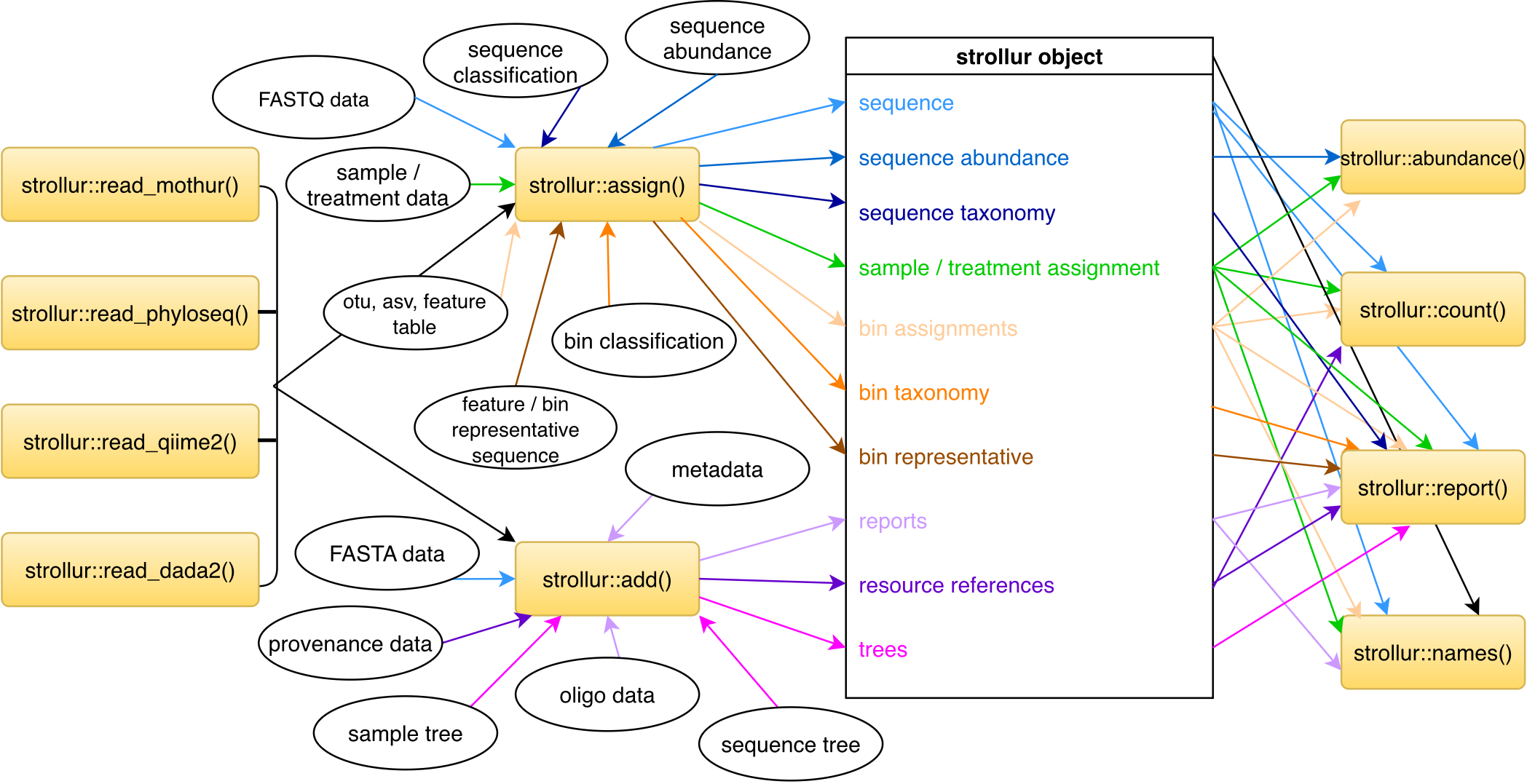
Public fields
dataRcpp::XPtr pointer to 'Dataset' c++ class. This allows package developers an easy access point to the underlying C++ code with additional functionality.
rawRcpp::RawVector containing the serialized data of the 'Dataset' c++ class. This allows the load and save functions to work with the class.
sequence_treea tree that relates sequences to each other
sample_treea tree that relates samples to each other
Methods
Public methods
strollur$new()
Create a new strollur::strollur object
Usage
strollur$new(name = "", dataset = NULL)
Arguments
nameString, name of dataset (optional)
dataseta
strollur::strollurobject.
Returns
A new strollur::strollur object.
Examples
# to create an empty strollur object, run the following:

data <- strollur::strollur$new("soil")
strollur$print()
Print a summary of the strollur::strollur object
Usage
strollur$print()
Returns
No return value, called for side effects.
Examples
miseq <- strollur::load_dataset(strollur_example("miseq_sop.rds"))
miseq
strollur$abundance()
Get the abundance data for sequences, bins, samples, and treatments.
Usage
strollur$abundance(type = "sequence", bin_type = "otu", by_sample = FALSE)
Arguments
typestring containing the type of data you want the number of. Options include: "sequence", "bin", "sample" and "treatment". Default = "sequence".
bin_typestring containing the bin type you would like the abundance data for. Default = "otu".
by_sampleLogical. When by_sample is TRUE, the abundance data will be parsed by sample. Default = FALSE.
Returns
data.frame
Examples
miseq <- strollur::load_dataset(strollur_example("miseq_sop.rds"))

# To the total abundance for each sequence
miseq$abundance(type = "sequence") |> head(n = 5)

# To the total abundance for each sequence parsed by sample
miseq$abundance(type = "sequence", by_sample = TRUE) |> head(n = 5)

# To the total abundance for each "otu" bin
miseq$abundance(type = "bin", bin_type = "otu") |> head(n = 5)

# To the total abundance for each "otu" bin parsed by sample
miseq$abundance(type = "bin", bin_type = "otu", by_sample = TRUE) |>
head(n = 5)

# To the total abundance for each "asv" bin
miseq$abundance(type = "bin", bin_type = "asv") |> head(n = 5)

# To the total abundance for each "asv" bin parsed by sample
miseq$abundance(type = "bin", bin_type = "asv", by_sample = TRUE) |>
head(n = 5)

# To the total abundance for each sample
miseq$abundance(type = "sample") |> head(n = 5)

# To the total abundance for each treatment
miseq$abundance(type = "treatment")
strollur$add()
Add sequences, reports, trees or resource references
Usage
strollur$add(
  table,
  type = "sequence",
  report_type = NULL,
  table_names = list(sequence_name = "sequence_name", sequence = "sequence", comment =
    "comment", quality_score = "quality_score", reference_vendor = "vendor",
    reference_name = "name", reference_version = "version", reference_usage = "usage",
    reference_note = "note", reference_method_url = "method_url",
    reference_documentation_url = "documentation_url", reference_parameter = "parameter",
    reference_citation = "citation"),
  reference = NULL,
  verbose = TRUE
)
Arguments
tablea data.frame or tree containing the data you wish to add.
typea string containing the type of data. Options include:
sequence,fastq,sample_tree,sequence_tree,resource_referenceandreport.report_typea string containing the type of report you are adding.
table_namesnamed list used to indicate the names of the columns in the table. By default:
table_names <- list(sequence_name = "sequence_name", comment = "comment", sequence = "sequence", quality_score = "quality_score", reference_name = "name", reference_vendor = "vendor", reference_version = "version", reference_usage = "usage", reference_note = "note", reference_documentation_url = "documentation_url", reference_method_url = "method_url", reference_parameter = "parameter", reference_citation = "citation")
In table_names, 'sequence_name' is a string containing the name of the column in 'table' that contains the sequence names. It is used when you are adding FASTA data. Default column name is 'sequence_name'.
In table_names, 'sequence' is a string containing the name of the column in 'table' that contains the sequence nucleotide strings. It is used when you are adding FASTA data. Default column name is 'sequence'.
In table_names, 'comment' is a string containing the name of the column in 'table' that contains the sequence comments. It is used when you are adding FASTA data. Default column name is 'comment'.
In table_names, 'quality_score' is a string containing the name of the column in 'table' that contains the sequence quality scores. It is used when you are adding FASTQ data. Default column name is 'quality_score'.
In table_names, 'reference_vendor' is a string containing the name of the column in 'table' that contains the reference vendor names. It is used when ' you are adding reference data. Default column name is 'vendor'.
In table_names, 'reference_name' is a string containing the name of the ' column in 'table' that contains the reference names. It is used when you are ' adding reference data. Default column name is 'name'.
In table_names, 'reference_version' is a string containing the name of the ' column in 'table' that contains the reference versions. Default column name is 'version'.
In table_names, 'reference_usage' is a string containing the name of the column in 'table' that contains the reference usages. Default column name is 'usage'.
In table_names, 'reference_note' is a string containing the name of the column in 'table' that contains the reference notes. Default column name is 'note'.
In table_names, 'reference_method_url' is a string containing the name of the column in 'table' that contains the reference method urls. Default column name is 'method_url'.
In table_names, 'reference_documentation_url' is a string containing the name of the column in 'table' that contains the reference urls. Default column name is 'documentation_url'.
In table_names, 'reference_parameter' is a string containing the name of the column in 'table' that contains the reference parameters. Default column name is 'parameter'.
In table_names, 'reference_citation' is a string containing the name of the column in 'table' that contains the reference citations. Default column name is 'citation'.
referencea list created by the function new_reference. Optional.
verboselogical, indicating whether or not you want progress messages. Default = TRUE.
Returns
Updated strollur::strollur object
Examples
fasta_data <- strollur::read_fasta(fasta =
strollur_example("final.fasta.gz"))
contigs_report <- readRDS(strollur_example("miseq_contigs_report.rds"))

# Create a new empty `strollur::strollur` object named 'example_dataset'
data <- strollur::strollur$new(name = "example_dataset")

data$add(table = fasta_data, type = "sequence")
data$add(
  table = contigs_report, type = "report",
  report_type = "contigs_report", list(sequence_name = "Name")
)

# To add metadata related to your study

metadata <- readRDS(strollur_example("miseq_metadata.rds"))

data$add(table = metadata, type = "report", report_type = "metadata")

# To add a tree relating to your sequences

tree <- ape::read.tree(strollur_example("final.phylip.tre.gz"))

data$add(table = tree, type = "sequence_tree")

# To add a tree relating to your samples
data <- strollur::strollur$new(name = "example_dataset")

df <-
strollur::read_mothur_shared(strollur_example("final.opti_mcc.shared"))
data$assign(table = df, type = "bin", bin_type = "otu")

tree <- ape::read.tree(strollur_example("final.opti_mcc.jclass.ave.tre"))

data$add(table = tree, type = "sample_tree")

# Create a new empty `strollur::strollur` object named 'example_dataset'
data <- strollur::strollur$new(name = "example_dataset")

# Read FASTQ data into data.frame
fastq_data <-
    strollur::read_fastq(fastq = strollur_example("tiny.fastq.gz"))

# Add FASTQ sequence data
data$add(table = fastq_data, type = "fastq")
strollur$alignment_length()
Get length of alignment
Usage
strollur$alignment_length()
Returns
Integer containing the length of the aligned sequences or -1 if unaligned.
Examples
data <- strollur::miseq_sop_example()
data$alignment_length()
strollur$assign()
Assign sequence abundances, sequence classifications, bins, bin representative sequences, sequence quality data, bin classifications, sample distances or treatments.
Usage
strollur$assign(
  table,
  type = "bin",
  bin_type = "otu",
  table_names = list(sequence_name = "sequence_name", quality_score = "quality_score",
    abundance = "abundance", sample = "sample", treatment = "treatment", taxonomy =
    "taxonomy", level = "level", confidence = "confidence", bin_name = "bin_name"),
  reference = NULL,
  verbose = TRUE
)
Arguments
tablea data.frame containing the data you wish to assign
typea string containing the type of data. Options include:
sequence_abundance,sequence_taxonomy,bin,qualitybin_representative,bin_taxonomy,sample_distanceandtreatment. Default =bin.bin_typestring containing the bin type you would like the number of bins for. Default =
otu.table_namesnamed list used to indicate the names of the columns in the table. By default:
table_names <- list(sequence_name = "sequence_name", abundance = "abundance", sample = "sample", treatment = "treatment", taxonomy = "taxonomy", bin_name = "bin_name")
In table_names,
sequence_nameis a string containing the name of the column in 'table' that contains the sequence names. Default column name is 'sequence_name'.In table_names,
quality_scoreis a string containing the name of the column in 'table' that contains the sequence quality scores. It is used when you are adding quality data. Default column name is 'quality_score'.In table_names,
abundanceis a string containing the name of the column in 'table' that contains the abundances. Default column name is 'abundance'.In table_names,
sampleis a string containing the name of the column in 'table' that contains the samples. Default column name is 'sample'.In table_names,
treatmentis a string containing the name of the column in 'table' that contains the treatment names. Default column name is 'treatment'.In table_names,
taxonomyis a string containing the name of the column in 'table' that contains the classifications. Default column name is 'taxonomy'.In table_names,
levelis a string containing the name of the column in the data.frame that contains the classifications. Default column name is 'level'.In table_names,
confidenceis a string containing the name of the column in the data.frame that contains the classifications confidence scores. Default column name is 'confidence'.In table_names,
bin_nameis a string containing the name of the column in 'table' that contains the bin names. Default column name is 'bin_name'.referencea list created by the function new_reference. Optional.
verboseboolean indicating whether or not you want progress messages. Default = TRUE.
Returns
Updated strollur::strollur object
Examples
# create a new empty strollur object named 'example_dataset'

data <- strollur::strollur$new(name = "example_dataset")

# Assign sequence abundances

abundance_by_sample <- strollur::read_mothur_count(strollur_example(
  "final.count_table.gz"
))

data$assign(table = abundance_by_sample, type = "sequence_abundance")

# Assign sequence classifications

sequence_classifications <-
strollur::read_mothur_taxonomy(strollur_example( "final.taxonomy.gz" ))

data$assign(table = sequence_classifications, type = "sequence_taxonomy")

# Assigning bins

# read mothur's otu list file into data.frame
otu_data <- strollur::read_mothur_list(list = strollur_example(
  "final.opti_mcc.list.gz"
))

# read mothur's asv list file into data.frame
asv_data <- strollur::read_mothur_list(list = strollur_example(
  "final.asv.list.gz"
))

# read mothur's phylotype list file into data.frame
phylo_data <- strollur::read_mothur_list(list = strollur_example(
  "final.tx.list.gz"
))

# read otu bin representative sequences into a data.frame
bin_reps <- readRDS(strollur_example(
                        "miseq_representative_sequences.rds"))

# assign 'otu' bins using sequence names
data$assign(table = otu_data, bin_type = "otu")

# assign 'asv' bins using sequence names
data$assign(table = asv_data, bin_type = "asv")

# assign 'phylotype' bins using sequence names
data$assign(table = phylo_data, bin_type = "phylotype")

# assign 'otu' bin representative sequences
data$assign(table = bin_reps, type = "bin_representative")

# To assign abundance only bins

# create a new empty strollur object named 'example_dataset'
data <- strollur::strollur$new(name = "example_dataset")

# read mothur's shared file
otu_data <-
strollur::read_mothur_shared(strollur_example("final.opti_mcc.shared"))

# assign abundance only otus parsed by sample
data$assign(table = otu_data, bin_type = "otu")

# Assigning bin classifications

# read bin taxonomies
otu_data <- strollur::read_mothur_cons_taxonomy(strollur_example(
  "final.cons.taxonomy"
))

# assign otu consensus taxonomies
data$assign(
  table = otu_data,
  type = "bin_taxonomy", bin_type = "otu"
)

# Assign treatments

sample_assignments <- readRDS(
   strollur_example("miseq_sample_design.rds"))

data$assign(table = sample_assignments, type = "treatment")

# Assign sample distances

dist_file <- strollur_example("final.opti_mcc.jclass.0.03.column.dist")
sample_dists <- readr::read_table(dist_file,
                                  col_names = FALSE,
                                  show_col_types = FALSE)
data$assign(table = sample_dists, type = "sample_distance")
strollur$clear()
Clear data from datasest
Usage
strollur$clear()
Returns
Updated strollur::strollur object
Examples
miseq <- strollur::load_dataset(strollur_example("miseq_sop.rds"))
miseq
miseq$clear()
miseq
strollur$count()
Find the number of sequences, samples, treatments or bins of a given type
Usage
strollur$count(
  type = "sequence",
  bin_type = "otu",
  samples = NULL,
  distinct = FALSE
)
Arguments
typestring containing the type of data you want the number of. Options include: "sequence", "sample", "treatment", "bin", and "resource_reference". Default = "sequence".
bin_typestring containing the bin type you would like the number of bins for. Default = "otu".
samplesvector of strings. samples is only used when 'type' = "sequence" or 'type' = "bin" . samples should contain the names of the samples you want the count for. Default = NULL.
distinctBoolean. distinct is used when 'type' = "sequence" or 'type' = "bin". When 'type' = "sequence" and distinct is TRUE the number of unique sequences is returned. When 'type' = "sequence" and distinct is FALSE the total number of sequences is returned. This can also be combined with samples to find the number of unique sequences found ONLY in a given set of samples, or to find the number of unique sequences in given set of samples that may also be present in other samples. When 'type' = "bin", you can set distinct = TRUE to return the number of bins that ONLY contain sequences from the given samples. When distinct is FALSE the count returned contains bins with sequences from a given samples, but those bins may also contain other samples. Default = FALSE.
Returns
double
Examples
miseq <- strollur::load_dataset(strollur_example("miseq_sop.rds"))

# To get the total number of sequences
miseq$count(type = "sequence")

# To get number of unique sequences
miseq$count(type = "sequence", distinct = TRUE)

# To get number of unique sequences from samples 'F3D0' and 'F3D1'
# Note these sequences will be present in both samples but may be
# be present in other samples as well
miseq$count(type = "sequence", samples = c("F3D0", "F3D1"))

# To get number of unique sequences exclusive to samples 'F3D0' and
# 'F3D1'. Note sequences are present in both samples and NOT present in
# any other samples.

miseq$count(type = "sequence",
            samples = c("F3D0", "F3D1"), distinct = TRUE )

# To get the number of samples in the dataset
miseq$count(type = "sample")

# To get the number of treatments in the dataset
miseq$count(type = "treatment")

# To get the number of "otu" bins in the dataset
miseq$count(type = "bin", bin_type = "otu")

# To get the number of "asv" bins in the dataset
miseq$count(type = "bin", bin_type = "asv")

# To get the number of "phylotype" bins in the dataset
miseq$count(type = "bin", bin_type = "phylotype")

# To get number of "otu" bins from samples 'F3D0' and 'F3D1'
# Note these bins will have sequences from both samples but there may be
# other samples present as well
miseq$count(
  type = "bin", bin_type = "otu", samples = c("F3D0", "F3D1")
)

# To get number of "otu" bins unique to samples 'F3D0' and 'F3D1'
# Note these bins will have sequences from both samples and NO other
# samples will be present in the bins.

miseq$count(
  type = "bin", bin_type = "otu",
  samples = c("F3D0", "F3D1"), distinct = TRUE
)
strollur$get_bin_types()
Get bin table types
Usage
strollur$get_bin_types()
Returns
vector of strings
Examples
data <- strollur::miseq_sop_example()
data$get_bin_types()
strollur$get_version()
Get the version of the strollur object
Usage
strollur$get_version()
Returns
a string
Examples
data <- strollur::strollur$new("test")

data$get_version()
strollur$has_bin_taxonomy()
Determine if your dataset contains bin classifications
Usage
strollur$has_bin_taxonomy(bin_type = "otu")
Arguments
bin_typestring containing the bin type you would like to check for classifaction data. Default = "otu".
Returns
a logical
Examples
miseq <- strollur::load_dataset(strollur_example("miseq_sop.rds"))

miseq$has_bin_taxonomy(bin_type = "otu")
strollur$has_sequence_taxonomy()
Determine if your dataset contains sequence classifications
Usage
strollur$has_sequence_taxonomy()
Returns
a logical
Examples
miseq <- strollur::load_dataset(strollur_example("miseq_sop.rds"))

miseq$has_sequence_taxonomy()
strollur$is_equal()
Determine if two strollur objects are equal.
Usage
strollur$is_equal(data)
Arguments
data,
Returns
a logical
Examples
miseq <- strollur::load_dataset(strollur_example("miseq_sop.rds"))

data <- strollur::copy_dataset(miseq)

miseq$is_equal(data)
strollur$names()
Get the names of a given type of data
Usage
strollur$names(
  type = "sequence",
  bin_type = "otu",
  samples = NULL,
  distinct = FALSE
)
Arguments
typestring containing the type of data you would like. Options include: "dataset", "sequence", "bin", "sample", "treatment", "report". Default = "sequence".
bin_typestring containing the bin type you would like the names for. Default = "otu".
samplesvector of strings. samples is only used when 'type' = "sequence" or 'type' = "bin" . samples should contain the names of the samples you want names for. Default = NULL.
distinctBoolean. distinct is used when 'type' = "sequence" or 'type' = "bin" and the samples parameter is used. The distinct parameter allows you to get the names that present given set of samples. When distinct is TRUE, the names function will return the names that ONLY contain data from the given samples. When distinct is FALSE the data returned contains data from a given samples, but may ALSO contain data from other samples. Default = FALSE.
Returns
vector of strings, containing the names requested
Examples
miseq <- strollur::load_dataset(strollur_example("miseq_sop.rds"))

# To get the name of the dataset
miseq$names(type = "dataset")

# To get the names of the sequences
miseq$names(type = "sequence")

# To get the names of the sequences present sample 'F3D0'
miseq$names(type = "sequence", samples = c("F3D0"))

#' # To get the names of the sequences unique to sample 'F3D0'
miseq$names(type = "sequence", samples = c("F3D0"), distinct = TRUE)

# To get the names of the samples
miseq$names(type = "sample")

# To get the names of the treatments
miseq$names(type = "treatment")

# To get the names of the bins
miseq$names(type = "bin")

# To get the names of the bins that are unique to 'F3D0'
miseq$names(type = "bin", samples = c("F3D0"), distinct = TRUE)

# To get the names of the bins that include sequences from 'F3D0'
miseq$names(type = "bin", samples = c("F3D0"), distinct = FALSE)

# To get the names of the reports
miseq$names(type = "report")
strollur$rename()
Rename your strollur object.
Usage
strollur$rename(name)
Arguments
namestring containing the new name for your dataset
Returns
Updated strollur::strollur object
Examples
data <- strollur::strollur$new("old_name")
data

data$rename("new_name")
data
strollur$report()
Get a data.frame containing the given report, or the phylo tree requested.
Usage
strollur$report(type = "sequence", bin_type = "otu")
Arguments
typestring containing the type of report you would like. Options include:
fasta,fastq,sequence,quality,sequence_bin_assignment,sequence_taxonomy,sequence_tree,bin_taxonomy,bin_representative,sample_assignment,sample_distance,sample_tree,resource_reference,sequence_scrap,bin_scrap. If you have added custom reports for alignment, contigs_assembly or chimeras, you can get those as well. Default =sequence.bin_typestring containing the bin type you would like a bin_taxonomy report for. Default =
otu.
Returns
data.frame or tree
Examples
miseq <- strollur::load_dataset(strollur_example("miseq_sop.rds"))

# To get the FASTA data

miseq$report(type = "fasta") |> head(n = 5)

# To get a report about the FASTA data

miseq$report(type = "sequence") |> head(n = 5)

# To get the sequence bin assignments

miseq$report(type = "sequence_bin_assignment", bin_type = "otu") |>
head(n = 5)

# To get the sample treatment assignments

miseq$report(type = "sample_assignment") |> head(n = 5)

# To get a report about sequence classifications

miseq$report(type = "sequence_taxonomy") |> head(n = 5)

# To get a report about bin classifications for 'otu' data

miseq$report(type = "bin_taxonomy", bin_type = "otu") |> head(n = 5)

# To get the 'otu' bin representative sequences

miseq$report(type = "bin_representative", bin_type = "otu") |>
head(n = 5)

# To get a report about the sequences removed during your analysis:

miseq$report(type = "sequence_scrap")

# To get a report about the "otu" bins removed during your analysis:

miseq$report(type = "bin_scrap", bin_type = "otu")

# To get the metadata associated with your data:

metadata <- miseq$report(type = "metadata") |> head(n = 5)

# To get the resource references associated with your data:

references <- miseq$report(type = "resource_reference")

# To get our custom report containing the contigs assembly data:

miseq$report(type = "contigs_report") |> head(n = 5)

# To get the tree that relates your sequences:

sequence_tree <- miseq$report(type = "sequence_tree")

# To get the tree that relates your sequences:

sample_tree <- miseq$report(type = "sample_tree")

# To get the distances between your samples:

sample_dists <- miseq$report(type = "sample_distance")
strollur$summary()
Summarize the sequences data, custom reports, and scrapped data
Usage
strollur$summary(type = "sequence", report_type = NULL, verbose = TRUE)
Arguments
typestring containing the type of data you want the number of. Options include: "sequence", "report" and "scrap". Default = "sequence".
report_typestring containing the report type you would summarized. For example, the miseq_sop_example includes contigs assembly data and can be accessed with report_type = "contigs_report". Default = NULL.
verboselogical indicating whether or not you want progress messages. Default = TRUE.
Returns
data.frame Get summary of the sequence reports
Examples
miseq <- strollur::load_dataset(strollur_example("miseq_sop.rds"))

# To get the summary of your FASTA data
miseq$summary(type = "sequence")

# summarize contigs_report
miseq$summary(type = "report", report_type = "contigs_report")

# remove sample 'F3D0' to produce a scrap report
strollur::xdev_remove_samples(data = miseq, samples = c("F3D0"))

# summarize scrapped data -
# sequences and bins scrapped by removing the sample "F3D0"
miseq$summary(type = "scrap")
strollur$clone()
The objects of this class are cloneable with this method.
Usage
strollur$clone(deep = FALSE)
Arguments
deepWhether to make a deep clone.
Author(s)
Sarah Westcott, swestcot@umich.edu
See Also
Examples
## ------------------------------------------------
## Method `strollur$new()`
## ------------------------------------------------


# to create an empty strollur object, run the following:

data <- strollur::strollur$new("soil")


## ------------------------------------------------
## Method `strollur$print()`
## ------------------------------------------------

miseq <- strollur::load_dataset(strollur_example("miseq_sop.rds"))
miseq


## ------------------------------------------------
## Method `strollur$abundance()`
## ------------------------------------------------


miseq <- strollur::load_dataset(strollur_example("miseq_sop.rds"))

# To the total abundance for each sequence
miseq$abundance(type = "sequence") |> head(n = 5)

# To the total abundance for each sequence parsed by sample
miseq$abundance(type = "sequence", by_sample = TRUE) |> head(n = 5)

# To the total abundance for each "otu" bin
miseq$abundance(type = "bin", bin_type = "otu") |> head(n = 5)

# To the total abundance for each "otu" bin parsed by sample
miseq$abundance(type = "bin", bin_type = "otu", by_sample = TRUE) |>
head(n = 5)

# To the total abundance for each "asv" bin
miseq$abundance(type = "bin", bin_type = "asv") |> head(n = 5)

# To the total abundance for each "asv" bin parsed by sample
miseq$abundance(type = "bin", bin_type = "asv", by_sample = TRUE) |>
head(n = 5)

# To the total abundance for each sample
miseq$abundance(type = "sample") |> head(n = 5)

# To the total abundance for each treatment
miseq$abundance(type = "treatment")


## ------------------------------------------------
## Method `strollur$add()`
## ------------------------------------------------


fasta_data <- strollur::read_fasta(fasta =
strollur_example("final.fasta.gz"))
contigs_report <- readRDS(strollur_example("miseq_contigs_report.rds"))

# Create a new empty `strollur::strollur` object named 'example_dataset'
data <- strollur::strollur$new(name = "example_dataset")

data$add(table = fasta_data, type = "sequence")
data$add(
  table = contigs_report, type = "report",
  report_type = "contigs_report", list(sequence_name = "Name")
)

# To add metadata related to your study

metadata <- readRDS(strollur_example("miseq_metadata.rds"))

data$add(table = metadata, type = "report", report_type = "metadata")

# To add a tree relating to your sequences

tree <- ape::read.tree(strollur_example("final.phylip.tre.gz"))

data$add(table = tree, type = "sequence_tree")

# To add a tree relating to your samples
data <- strollur::strollur$new(name = "example_dataset")

df <-
strollur::read_mothur_shared(strollur_example("final.opti_mcc.shared"))
data$assign(table = df, type = "bin", bin_type = "otu")

tree <- ape::read.tree(strollur_example("final.opti_mcc.jclass.ave.tre"))

data$add(table = tree, type = "sample_tree")

# Create a new empty `strollur::strollur` object named 'example_dataset'
data <- strollur::strollur$new(name = "example_dataset")

# Read FASTQ data into data.frame
fastq_data <-
    strollur::read_fastq(fastq = strollur_example("tiny.fastq.gz"))

# Add FASTQ sequence data
data$add(table = fastq_data, type = "fastq")


## ------------------------------------------------
## Method `strollur$alignment_length()`
## ------------------------------------------------


data <- strollur::miseq_sop_example()
data$alignment_length()


## ------------------------------------------------
## Method `strollur$assign()`
## ------------------------------------------------


# create a new empty strollur object named 'example_dataset'

data <- strollur::strollur$new(name = "example_dataset")

# Assign sequence abundances

abundance_by_sample <- strollur::read_mothur_count(strollur_example(
  "final.count_table.gz"
))

data$assign(table = abundance_by_sample, type = "sequence_abundance")

# Assign sequence classifications

sequence_classifications <-
strollur::read_mothur_taxonomy(strollur_example( "final.taxonomy.gz" ))

data$assign(table = sequence_classifications, type = "sequence_taxonomy")

# Assigning bins

# read mothur's otu list file into data.frame
otu_data <- strollur::read_mothur_list(list = strollur_example(
  "final.opti_mcc.list.gz"
))

# read mothur's asv list file into data.frame
asv_data <- strollur::read_mothur_list(list = strollur_example(
  "final.asv.list.gz"
))

# read mothur's phylotype list file into data.frame
phylo_data <- strollur::read_mothur_list(list = strollur_example(
  "final.tx.list.gz"
))

# read otu bin representative sequences into a data.frame
bin_reps <- readRDS(strollur_example(
                        "miseq_representative_sequences.rds"))

# assign 'otu' bins using sequence names
data$assign(table = otu_data, bin_type = "otu")

# assign 'asv' bins using sequence names
data$assign(table = asv_data, bin_type = "asv")

# assign 'phylotype' bins using sequence names
data$assign(table = phylo_data, bin_type = "phylotype")

# assign 'otu' bin representative sequences
data$assign(table = bin_reps, type = "bin_representative")

# To assign abundance only bins

# create a new empty strollur object named 'example_dataset'
data <- strollur::strollur$new(name = "example_dataset")

# read mothur's shared file
otu_data <-
strollur::read_mothur_shared(strollur_example("final.opti_mcc.shared"))

# assign abundance only otus parsed by sample
data$assign(table = otu_data, bin_type = "otu")

# Assigning bin classifications

# read bin taxonomies
otu_data <- strollur::read_mothur_cons_taxonomy(strollur_example(
  "final.cons.taxonomy"
))

# assign otu consensus taxonomies
data$assign(
  table = otu_data,
  type = "bin_taxonomy", bin_type = "otu"
)

# Assign treatments

sample_assignments <- readRDS(
   strollur_example("miseq_sample_design.rds"))

data$assign(table = sample_assignments, type = "treatment")

# Assign sample distances

dist_file <- strollur_example("final.opti_mcc.jclass.0.03.column.dist")
sample_dists <- readr::read_table(dist_file,
                                  col_names = FALSE,
                                  show_col_types = FALSE)
data$assign(table = sample_dists, type = "sample_distance")


## ------------------------------------------------
## Method `strollur$clear()`
## ------------------------------------------------

miseq <- strollur::load_dataset(strollur_example("miseq_sop.rds"))
miseq
miseq$clear()
miseq

## ------------------------------------------------
## Method `strollur$count()`
## ------------------------------------------------


miseq <- strollur::load_dataset(strollur_example("miseq_sop.rds"))

# To get the total number of sequences
miseq$count(type = "sequence")

# To get number of unique sequences
miseq$count(type = "sequence", distinct = TRUE)

# To get number of unique sequences from samples 'F3D0' and 'F3D1'
# Note these sequences will be present in both samples but may be
# be present in other samples as well
miseq$count(type = "sequence", samples = c("F3D0", "F3D1"))

# To get number of unique sequences exclusive to samples 'F3D0' and
# 'F3D1'. Note sequences are present in both samples and NOT present in
# any other samples.

miseq$count(type = "sequence",
            samples = c("F3D0", "F3D1"), distinct = TRUE )

# To get the number of samples in the dataset
miseq$count(type = "sample")

# To get the number of treatments in the dataset
miseq$count(type = "treatment")

# To get the number of "otu" bins in the dataset
miseq$count(type = "bin", bin_type = "otu")

# To get the number of "asv" bins in the dataset
miseq$count(type = "bin", bin_type = "asv")

# To get the number of "phylotype" bins in the dataset
miseq$count(type = "bin", bin_type = "phylotype")

# To get number of "otu" bins from samples 'F3D0' and 'F3D1'
# Note these bins will have sequences from both samples but there may be
# other samples present as well
miseq$count(
  type = "bin", bin_type = "otu", samples = c("F3D0", "F3D1")
)

# To get number of "otu" bins unique to samples 'F3D0' and 'F3D1'
# Note these bins will have sequences from both samples and NO other
# samples will be present in the bins.

miseq$count(
  type = "bin", bin_type = "otu",
  samples = c("F3D0", "F3D1"), distinct = TRUE
)


## ------------------------------------------------
## Method `strollur$get_bin_types()`
## ------------------------------------------------


data <- strollur::miseq_sop_example()
data$get_bin_types()


## ------------------------------------------------
## Method `strollur$get_version()`
## ------------------------------------------------


data <- strollur::strollur$new("test")

data$get_version()


## ------------------------------------------------
## Method `strollur$has_bin_taxonomy()`
## ------------------------------------------------


miseq <- strollur::load_dataset(strollur_example("miseq_sop.rds"))

miseq$has_bin_taxonomy(bin_type = "otu")


## ------------------------------------------------
## Method `strollur$has_sequence_taxonomy()`
## ------------------------------------------------


miseq <- strollur::load_dataset(strollur_example("miseq_sop.rds"))

miseq$has_sequence_taxonomy()


## ------------------------------------------------
## Method `strollur$is_equal()`
## ------------------------------------------------


miseq <- strollur::load_dataset(strollur_example("miseq_sop.rds"))

data <- strollur::copy_dataset(miseq)

miseq$is_equal(data)


## ------------------------------------------------
## Method `strollur$names()`
## ------------------------------------------------


miseq <- strollur::load_dataset(strollur_example("miseq_sop.rds"))

# To get the name of the dataset
miseq$names(type = "dataset")

# To get the names of the sequences
miseq$names(type = "sequence")

# To get the names of the sequences present sample 'F3D0'
miseq$names(type = "sequence", samples = c("F3D0"))

#' # To get the names of the sequences unique to sample 'F3D0'
miseq$names(type = "sequence", samples = c("F3D0"), distinct = TRUE)

# To get the names of the samples
miseq$names(type = "sample")

# To get the names of the treatments
miseq$names(type = "treatment")

# To get the names of the bins
miseq$names(type = "bin")

# To get the names of the bins that are unique to 'F3D0'
miseq$names(type = "bin", samples = c("F3D0"), distinct = TRUE)

# To get the names of the bins that include sequences from 'F3D0'
miseq$names(type = "bin", samples = c("F3D0"), distinct = FALSE)

# To get the names of the reports
miseq$names(type = "report")


## ------------------------------------------------
## Method `strollur$rename()`
## ------------------------------------------------


data <- strollur::strollur$new("old_name")
data

data$rename("new_name")
data


## ------------------------------------------------
## Method `strollur$report()`
## ------------------------------------------------


miseq <- strollur::load_dataset(strollur_example("miseq_sop.rds"))

# To get the FASTA data

miseq$report(type = "fasta") |> head(n = 5)

# To get a report about the FASTA data

miseq$report(type = "sequence") |> head(n = 5)

# To get the sequence bin assignments

miseq$report(type = "sequence_bin_assignment", bin_type = "otu") |>
head(n = 5)

# To get the sample treatment assignments

miseq$report(type = "sample_assignment") |> head(n = 5)

# To get a report about sequence classifications

miseq$report(type = "sequence_taxonomy") |> head(n = 5)

# To get a report about bin classifications for 'otu' data

miseq$report(type = "bin_taxonomy", bin_type = "otu") |> head(n = 5)

# To get the 'otu' bin representative sequences

miseq$report(type = "bin_representative", bin_type = "otu") |>
head(n = 5)

# To get a report about the sequences removed during your analysis:

miseq$report(type = "sequence_scrap")

# To get a report about the "otu" bins removed during your analysis:

miseq$report(type = "bin_scrap", bin_type = "otu")

# To get the metadata associated with your data:

metadata <- miseq$report(type = "metadata") |> head(n = 5)

# To get the resource references associated with your data:

references <- miseq$report(type = "resource_reference")

# To get our custom report containing the contigs assembly data:

miseq$report(type = "contigs_report") |> head(n = 5)

# To get the tree that relates your sequences:

sequence_tree <- miseq$report(type = "sequence_tree")

# To get the tree that relates your sequences:

sample_tree <- miseq$report(type = "sample_tree")

# To get the distances between your samples:

sample_dists <- miseq$report(type = "sample_distance")


## ------------------------------------------------
## Method `strollur$summary()`
## ------------------------------------------------


miseq <- strollur::load_dataset(strollur_example("miseq_sop.rds"))

# To get the summary of your FASTA data
miseq$summary(type = "sequence")

# summarize contigs_report
miseq$summary(type = "report", report_type = "contigs_report")

# remove sample 'F3D0' to produce a scrap report
strollur::xdev_remove_samples(data = miseq, samples = c("F3D0"))

# summarize scrapped data -
# sequences and bins scrapped by removing the sample "F3D0"
miseq$summary(type = "scrap")
strollur_example
Description
strollur comes bundled with some example files in its inst/extdata
directory. This function make them easy to access them.
Usage
strollur_example(file = NULL)
Arguments
file |
Name of file. |
Details
Get path to strollur example
Value
string, Full path to example files
Examples
strollur::strollur_example()
strollur::strollur_example("final.fasta.gz")
Summarize the sequences data, custom reports, and scrapped data in a strollur object
Description
Summarize the sequences data, custom reports, and scrapped data in a strollur object
Usage
summary(data, type = "sequence", report_type = NULL, verbose = TRUE)
Arguments
data |
|
type |
string containing the type of data you want the number of. Options include: "sequence", "report" and "scrap". Default = "sequence". |
report_type |
string containing the report type you would summarized. For example, the miseq_sop_example includes contigs assembly data and can be accessed with report_type = "contigs_report". Default = NULL. |
verbose |
boolean indicating whether or not you want progress messages. Default = TRUE. |
Value
data.frame
Examples
miseq <- strollur::miseq_sop_example()

# To get the summary of your FASTA data
strollur::summary(data = miseq, type = "sequence")

# summarize contigs_report
strollur::summary(data = miseq,
                  type = "report", report_type = "contigs_report")

# remove sample 'F3D0' to produce a scrap report
strollur::xdev_remove_samples(data = miseq, samples = c("F3D0"))

# summarize FASTA data after removal of sample F3D0
strollur::summary(data = miseq, type = "sequence")

# summarize scrapped data -
# sequences and bins scrapped by removing the sample "F3D0"
strollur::summary(data = miseq, type = "scrap")
taxonomy_table_format
Description
strollur accepts two formats for classification data: full or tidy.
Details
The full taxonomy table is a data.frame with two columns: sequence_name
or bin_name, and taxonomy. The taxonomy column contains the full
classification string.
The full taxonomy table format:
sequence_name
M00967_43_000000000-A3JHG_1_1102_26308_14496
M00967_43_000000000-A3JHG_1_1103_22654_26891

taxonomy
Bacteria(100);"Bacteroidetes"(100);"Bacteroidia"(100);"Bacteroidales"(100);
Bacteria(100);Firmicutes(99);Clostridia(99);Clostridiales(99);
The tidy taxonomy table is a data.frame with 4 columns: sequence_name
or bin_name, taxonomy, level, and confidence. For example:
The tidy taxonomy table format:
sequence_name                                    taxonomy
M00967_43_000000000-A3JHG_1_1102_26308_14496     Bacteria
M00967_43_000000000-A3JHG_1_1102_26308_14496     "Bacteroidetes"
M00967_43_000000000-A3JHG_1_1102_26308_14496     "Bacteroidia"
M00967_43_000000000-A3JHG_1_1102_26308_14496     "Bacteroidales"
M00967_43_000000000-A3JHG_1_1103_22654_26891     Bacteria
M00967_43_000000000-A3JHG_1_1103_22654_26891     Firmicutes
M00967_43_000000000-A3JHG_1_1103_22654_26891     Clostridia
M00967_43_000000000-A3JHG_1_1103_22654_26891     Clostridiales

level    confidence
1        100
2        100
3        100
4        100
1        100
2        99
3        99
4        99
The unpack_qiime2_artifact function reads .qza files created by qiime2, and returns the artifact.
Description
The unpack_qiime2_artifact function reads .qza files created by qiime2, and returns the artifact.
Usage
unpack_qiime2_artifact(qza, dir_path = NULL)
Arguments
qza |
filename, a .qza file containing artifact |
dir_path |
a string containing the name of directory where the artifacts files should be written. Default = current working directory. |
Value
A unpacked qza artifact
Examples
# Using the example files from moving-pictures

artifact <- strollur::unpack_qiime2_artifact(
  qza = strollur_example("table.qza"),
  dir_path = tempdir()
)
Write a BIOM formatted file containing a strollur object's data.
Description
Write a BIOM formatted file containing your strollur::strollur objects data.
Usage
write_biom(
  data,
  file_root = NULL,
  path = NULL,
  taxonomy = TRUE,
  sequence = TRUE
)
Arguments
data |
|
file_root |
a string containing the root name of the output file.
Default = |
path |
string containing the name of directory where the files should be written. Default = current working directory. |
taxonomy |
logical, when |
sequence |
logical, when |
Value
vector of BIOM file names. One for each bin type.
Examples
if (requireNamespace("h5lite", quietly = TRUE)) {
  miseq <- strollur::miseq_sop_example()
  strollur::write_biom(miseq, tempfile())
} else {
  message(paste(
    "To use this functionality you have to install the",
    "h5lite package."
  ))
}
Write a FASTA formatted sequence file
Description
Write a FASTA formatted sequence file
Usage
write_fasta(data, filename = NULL, degap = FALSE)
Arguments
data |
|
filename |
a string containing the name of the output file. Default = 'dataset_name'.fasta |
degap |
a logical. Default = FALSE. When |
Value
name of FASTA file
Examples
miseq <- strollur::miseq_sop_example()
strollur::write_fasta(miseq, tempfile())
Write a FASTQ formatted file
Description
Write a FASTQ formatted file
Usage
write_fastq(data, filename = NULL)
Arguments
data |
|
filename |
a string containing the name of the output file. Default = 'dataset_name'.fastq |
Value
name of FASTQ file
Examples
table <- strollur::read_fastq(strollur_example("tiny.fastq.gz"))

# Create `strollur::strollur` object
data <- strollur::new_dataset("example")

# Add FASTQ data `strollur::strollur` object
strollur::add(data, table, type = "fastq")

# Write `strollur::strollur` objects FASTQ data to file
strollur::write_fastq(data, tempfile())
Write the various file types from your strollur object for use with mothur.
Description
The write_mothur function will write various file types for use with mothur.
Usage
write_mothur(data, dir_path = NULL, compress = TRUE, tags = NULL)
Arguments
data |
|
dir_path |
a string containing the name of directory where the files should be written. Default = current working directory. |
compress |
logical, Default = TRUE. |
tags |
a vector of strings containing the items you wish to write Options are 'sequence_data', 'bin_data', 'metadata', 'resource_reference', 'sequence_tree', 'sample_tree' and 'report'. By default, everything is written to files. |
Value
a vector of file names
References
Schloss,P.D., Westcott,S.L., Ryabin,T., Hall,J.R., Hartmann,M., Hollister,E.B., Lesniewski,R.A., Oakley,B.B., Parks,D.H., Robinson,C.J., Sahl,J.W., Stres,B., Thallinger,G.G., Van Horn,D.J. and Weber,C.F. (2009), Introducing mothur: Open-source, platform-independent, community-supported software for describing and comparing microbial communities. Applied and Environmental Microbiology 75:7537-7541. https://doi.org/10.1128/AEM.01541-09
Examples
miseq <- strollur::miseq_sop_example()
files <- strollur::write_mothur(miseq, tempdir(), compress = FALSE)
Write a mothur formatted cons_taxonomy file
Description
Write a mothur formatted cons_taxonomy file
Usage
write_mothur_cons_taxonomy(data, file_root = NULL)
Arguments
data |
|
file_root |
a string containing the root name of the output file. Default = 'dataset_name'. Resulting in output files 'dataset_name'.bin_type'.cons.taxonomy. |
Value
vector containing the names of the files created
Examples
miseq <- strollur::miseq_sop_example()
strollur::write_mothur_cons_taxonomy(miseq, tempfile())
Write a mothur formatted count file
Description
Write a mothur formatted count file
Usage
write_mothur_count(data, filename = NULL)
Arguments
data |
|
filename |
a string containing the name of the output file. Default = 'dataset_name'.count_table |
Value
name of count file
Examples
miseq <- strollur::miseq_sop_example()
strollur::write_mothur_count(miseq, tempfile())
Write a mothur formatted design file
Description
Write a mothur formatted design file
Usage
write_mothur_design(data, filename = NULL)
Arguments
data |
|
filename |
a string containing the name of the output file. Default = 'dataset_name'.design |
Value
name of design file
Examples
miseq <- strollur::miseq_sop_example()
strollur::write_mothur_design(miseq, tempfile())
Write mothur formatted list files
Description
Write mothur formatted list files
Usage
write_mothur_list(data, file_root = NULL)
Arguments
data |
|
file_root |
a string containing the root name of the output file.
Default = 'dataset_name'. Resulting in output files
|
Value
vector containing the names of the files created
Examples
miseq <- strollur::miseq_sop_example()
strollur::write_mothur_list(miseq, tempfile())
Write mothur formatted rabund files
Description
Write mothur formatted rabund files
Usage
write_mothur_rabund(data, file_root = NULL)
Arguments
data |
|
file_root |
a string containing the root name of the output file.
Default = 'dataset_name'. Resulting in output files
|
Value
vector containing the names of the files created
Examples
miseq <- strollur::miseq_sop_example()
strollur::write_mothur_rabund(miseq, tempfile())
Write mothur formatted shared files
Description
Write mothur formatted shared files
Usage
write_mothur_shared(data, file_root = NULL)
Arguments
data |
|
file_root |
a string containing the root name of the output file.
Default = 'dataset_name'. Resulting in output files
|
Value
vector containing the names of the files created
Examples
miseq <- strollur::miseq_sop_example()
strollur::write_mothur_shared(miseq, tempfile())
Create a phyloseq object from your strollur object
Description
The strollur::write_phyloseq() function will take any strollur object and
return it as a phyloseq object.
Usage
write_phyloseq(data)
Arguments
data |
Value
returns a phyloseq object.
References
McMurdie,P.J. and Holmes,S. (2013), phyloseq: An R Package for Reproducible Interactive Analysis and Graphics of Microbiome Census Data. PLoS ONE 8:e61217. https://doi.org/10.1371/journal.pone.0061217
Examples
miseq <- strollur::miseq_sop_example()
if (requireNamespace("phyloseq", quietly = TRUE)) {
  phylo_obj <- strollur::write_phyloseq(miseq)
} else {
  message(paste(
    "To use this functionality you have to install the",
    "phyloseq package."
  ))
}
Write a file containing sequence quality scores
Description
Write a file containing sequence quality scores
Usage
write_quality(data, filename = NULL)
Arguments
data |
|
filename |
a string containing the name of the output file. Default = 'dataset_name'.qual |
Value
name of sequence quality file
Examples
table <- strollur::read_fastq(strollur_example("tiny.fastq.gz"))

# Create `strollur::strollur` object
data <- strollur::new_dataset("example")

# Add FASTQ data `strollur::strollur` object
strollur::add(data, table, type = "fastq")

# Write `strollur::strollur` objects sequence quality data to file
strollur::write_quality(data, tempfile())
Write a 2 column taxonomy file
Description
Write a 2 column taxonomy file
Usage
write_taxonomy(data, filename = NULL)
Arguments
data |
|
filename |
a string containing the name of the output file. Default = 'dataset_name'.taxonomy |
Value
name of taxonomy file
Examples
miseq <- strollur::miseq_sop_example()
strollur::write_taxonomy(miseq, tempfile())
Get a data.frame containing the requested abundance data
Description
Get a table containing the requested abundance data in a strollur object
Usage
xdev_abundance(data, type = "sequence", bin_type = "otu", by_sample = FALSE)
Arguments
data |
|
type |
string containing the type of data you want the number of. Options include: "sequence", "bin". Default = "sequence". |
bin_type |
string containing the bin type you would like the number of bins for. Default = "otu". |
by_sample |
Boolean. When by_sample is TRUE, the abundance data will be parsed by sample. Default = FALSE. |
Value
data.frame
Examples
miseq <- strollur::miseq_sop_example()

# To the total abundance for each sequence
strollur::xdev_abundance(data = miseq, type = "sequence")

# To the total abundance for each sequence parsed by sample
strollur::xdev_abundance(data = miseq, type = "sequence",
                           by_sample = TRUE)

# To the total abundance for each "otu" bin
strollur::xdev_abundance(data = miseq, type = "bin",
                           bin_type = "otu")

# To the total abundance for each "otu" bin parsed by sample
strollur::xdev_abundance(data = miseq, type = "bin",
                           bin_type = "otu", by_sample = TRUE)

# To the total abundance for each "asv" bin
strollur::xdev_abundance(data = miseq, type = "bin",
                           bin_type = "asv")

# To the total abundance for each "asv" bin parsed by sample
strollur::xdev_abundance(data = miseq, type = "bin",
                           bin_type = "asv", by_sample = TRUE)

# To the total abundance of each sample
strollur::xdev_abundance(data = miseq, type = "sample")

# To the total abundance of each treatment
strollur::xdev_abundance(data = miseq, type = "treatment")
Add resource references to a strollur object to aid in reproducibility
Description
Add resource references to a strollur object
Usage
xdev_add_references(
  data,
  table,
  name = "name",
  vendor = "vendor",
  version = "version",
  usage = "usage",
  note = "note",
  method_url = "method_url",
  documentation_url = "documentation_url",
  parameter = "parameter",
  citation = "citation",
  verbose = TRUE
)
Arguments
data |
|
table |
a data.frame containing reference_names, reference_versions (optional), reference_usages (optional), reference_parameters (optional), reference_methods (optional), and reference_urls (optional). |
name |
a string containing the name of the column in 'table' that contains the reference names. Default column name is 'name'. |
vendor |
a string containing the name of the column in 'table' that contains the reference vendors. Default column name is 'vendor'. |
version |
a string containing the name of the column in 'table' that contains the reference versions. Default column name is 'version'. |
usage |
a string containing the name of the column in 'table' that contains the reference usages. Default column name is 'usage'. |
note |
a string containing the name of the column in 'table' that contains the reference notes. Default column name is 'note'. |
method_url |
a string containing the name of the column in 'table' that contains the reference methods. Default column name is 'method_url'. |
documentation_url |
a string containing the name of the column in 'table' that contains the reference documentation urls. Default column name is 'documentation_url'. |
parameter |
a string containing the name of the column in 'table' that contains the reference parameters. Default column name is 'parameter'. |
citation |
a string containing the name of the column in 'table' that contains the reference citations. Default column name is 'citation'. |
verbose |
a boolean whether or not you want progress messages. Default = TRUE. |
Value
an updated strollur object
Examples
data <- strollur::new_dataset("just for fun")
reference_table <- readr::read_csv(strollur_example("references.csv"),
                             col_names = TRUE, show_col_types = FALSE)
strollur::xdev_add_references(data, reference_table)
Add a report to a strollur object
Description
Add a report to a strollur object
Usage
xdev_add_report(
  data,
  table,
  reference = NULL,
  type = "report",
  sequence_name = "none",
  verbose = TRUE
)
Arguments
data |
|
table |
a data.frame containing your report. |
reference |
a list created by the function new_reference. Optional. |
type |
a string containing the type of report. Default = "report". |
sequence_name |
a string. If your report relates to the sequence data,
|
verbose |
a boolean whether or not you want progress messages. Default = TRUE. |
Value
an updated strollur object
Examples
# To add a custom report including your contigs assembly data

data <- strollur::new_dataset("just for fun")
contigs_report <- readRDS(strollur_example("miseq_contigs_report.rds"))

strollur::xdev_add_report(data,
                            table = contigs_report,
                            type = "contigs_report",
                            sequence_name = "Name")

# To add metadata related to your study

metadata <- readRDS(strollur_example("miseq_metadata.rds"))

strollur::xdev_add_report(data,
                            table = metadata,
                            type = "metadata")
Add FASTQ data to a strollur object
Description
Add FASTQ data to a strollur object.
Usage
xdev_add_sequence_fastq_scores(
  data,
  table,
  reference = NULL,
  sequence_name = "sequence_name",
  sequence = "sequence",
  quality_score = "quality_score",
  verbose = TRUE
)
Arguments
data |
|
table |
a data.frame containing FASTQ data you are trying to add |
reference |
a list created by the function new_reference. Optional. |
sequence_name |
a string containing the name of the column in 'table' that contains the sequence names. Default column name is 'sequence_name'. |
sequence |
a string containing the name of the column in 'table' that contains the sequence nucleotide strings. Default column name is 'sequence'. (Optional) |
quality_score |
a string containing the name of the column in 'table' that contains the quality scores. Default column name is 'quality_score'. |
verbose |
a logical whether or not you want progress messages. Default = TRUE. |
Value
an updated strollur object
Examples
table <- strollur::read_fastq(strollur_example("tiny.fastq.gz"))
data <- strollur::new_dataset("example")
strollur::xdev_add_sequence_fastq_scores(data, table)
data
Add sequence data to a strollur object
Description
Add sequence data to a strollur object
Usage
xdev_add_sequences(
  data,
  table,
  reference = NULL,
  sequence_name = "sequence_name",
  sequence = "sequence",
  comment = "comment",
  verbose = TRUE
)
Arguments
data |
|
table |
a data.frame containing names, sequences(optional) and comments(optional). |
reference |
a list created by the function new_reference. Optional. |
sequence_name |
a string containing the name of the column in 'table' that contains the sequence names. Default column name is 'sequence_name'. |
sequence |
a string containing the name of the column in 'table' that contains the sequence nucleotide strings. Default column name is 'sequence'. |
comment |
a string containing the name of the column in 'table' that contains the sequence comments. Default column name is 'comment'. |
verbose |
a boolean whether or not you want progress messages. Default = TRUE. |
Value
an updated strollur object
Examples
 data <- strollur::new_dataset("miseq_sop")
 fasta_data <- strollur::read_fasta(strollur_example("final.fasta.gz"))
 strollur::xdev_add_sequences(data, fasta_data)

# With the additional parameters to add information about the reference

 data <- strollur::new_dataset("miseq_sop")
 fasta_data <- strollur::read_fasta(strollur_example("final.fasta.gz"))

 strollur::xdev_add_sequences(data, fasta_data,
               new_reference("silva.bacteria.fasta",
               "1.38.1",
               "alignment by mothur2 v1.0 using default options",
               "https://mothur.org/wiki/silva_reference_files/"))

# You can also add references using the `strollur::xdev_add_references`
# function.
Assign representative sequences to bins
Description
Assign representative sequences to bins.
Usage
xdev_assign_bin_representative_sequences(
  data,
  table,
  bin_type = "otu",
  reference = NULL,
  bin_name = "bin_name",
  sequence_name = "sequence_name",
  verbose = TRUE
)
Arguments
data |
|
table |
a data.frame containing bin representative assignments |
bin_type |
a string indicating the type of bin assignments. Default "otu". |
reference |
a list created by the function new_reference. Optional. |
bin_name |
a string containing the name of the column in 'table' that contains the bin names. Default column name is 'bin_name'. |
sequence_name |
a string containing the name of the column in 'table' that contains the bin names. Default column name is 'sequence_name'. |
verbose |
a boolean whether or not you want progress messages. Default = TRUE. |
Value
an updated strollur object
Examples
  miseq <- strollur::miseq_sop_example()

  bin_reps <- readRDS(strollur_example(
         "miseq_representative_sequences.rds"))

  strollur::xdev_assign_bin_representative_sequences(miseq,
                          table = bin_reps, bin_type = "otu")
Assign bin classifications to a strollur object
Description
Assign bin classifications to a strollur object
Note, if you assign sequence taxonomies and assign bins, strollur will find
the concensus taxonomy for each bin for you.
Usage
xdev_assign_bin_taxonomy(
  data,
  table,
  bin_type = "otu",
  reference = NULL,
  bin_name = "bin_name",
  taxonomy = "taxonomy",
  verbose = TRUE
)
Arguments
data |
|
table |
a data.frame containing bin taxonomy assignments |
bin_type |
a string indicating the type of bin assignments. Default "otu". |
reference |
a list created by the function new_reference. Optional. |
bin_name |
a string containing the name of the column in 'table' that contains the bin names. Default column name is 'bin_name'. |
taxonomy |
a string containing the name of the column in 'table' that contains the bin taxonomies. Default column name is 'taxonomy'. |
verbose |
a boolean whether or not you want progress messages. Default = TRUE. |
Value
an updated strollur object
Examples
otu_data <- strollur::read_mothur_cons_taxonomy(strollur_example(
                        "final.cons.taxonomy"))

data <- strollur::new_dataset(dataset_name = "my_dataset")

# assign otu abundances
strollur::xdev_assign_bins(data,
                             table = otu_data,
                             bin_type = "otu")

# assign otu classifications
strollur::xdev_assign_bin_taxonomy(data,
                                     table = otu_data,
                                     bin_type = "otu")
Assign bin classifications to a strollur object
Description
Assign bin classifications to a strollur object
Usage
xdev_assign_bin_taxonomy_tidy(
  data,
  table,
  bin_type = "otu",
  reference = NULL,
  bin_name = "bin_name",
  level = "level",
  taxonomy = "taxonomy",
  confidence = "confidence",
  verbose = TRUE
)
Arguments
data |
|
table |
a data.frame containing bin taxonomy assignments |
bin_type |
a string indicating the type of bin assignments. Default "otu". |
reference |
a list created by the function new_reference. Optional. |
bin_name |
a string containing the name of the column in 'table' that contains the bin names. Default column name is 'bin_name'. |
level |
a string containing the name of the column in 'table' that contains the taxonomy levels. Default column name is 'level'. |
taxonomy |
a string containing the name of the column in 'table' that contains the bin taxonomies. Default column name is 'taxonomy'. |
confidence |
a string containing the name of the column in 'table' that contains the taxonomies confidence. Default column name is 'confidence'. |
verbose |
a logical whether or not you want progress messages. Default = TRUE. |
Value
an updated strollur object
Examples
bin_classifications <- readRDS(strollur_example("miseq_tidy_bin_taxonomy.rds"))
str(bin_classifications)

data <- strollur::read_mothur(otu_shared =
                                strollur_example("final.opti_mcc.shared"))

xdev_assign_bin_taxonomy_tidy(data, bin_classifications)

# With the reference parameter you can add information about the reference
# you used to classify your bins. You can also add references using the
# 'strollur::xdev_add_references' function.

reference <- new_reference("trainset9_032012.pds.zip", "9_032012",
              "classification_otu by mothur2 v1.0.0 using default options",
               "",
"https://mothur.s3.us-east-2.amazonaws.com/wiki/trainset9_032012.pds.zip")

xdev_assign_bin_taxonomy_tidy(data, bin_classifications,
                                 reference = reference)
Add bin assignments to a strollur object
Description
Add bin assignments to a strollur object
Usage
xdev_assign_bins(
  data,
  table,
  bin_type = "otu",
  reference = NULL,
  bin_name = "bin_name",
  abundance = "abundance",
  sample = "sample",
  sequence_name = "sequence_name",
  verbose = TRUE
)
Arguments
data |
|
table |
a data.frame containing bin_data assignments |
bin_type |
a string indicating the type of bin assignments. Default "otu". |
reference |
a list created by the function new_reference. Optional. |
bin_name |
a string containing the name of the column in 'table' that contains the bin names. Default column name is 'bin_name'. |
abundance |
a string containing the name of the column in 'table' that contains the bin abundances. Default column name is 'abundance'. Note: You must provide either abundance or sequence_name in the table. |
sample |
a string containing the name of the column in 'table' that contains the sample names for datasets where the abundances are broken down by sample. Default column name is 'sample'. |
sequence_name |
a string containing the name of the column in 'table' that contains the sequence names. Default column name is 'sequence_name'. Note: You must provide either abundance or sequence_name in the table. |
verbose |
a boolean whether or not you want progress messages. Default = TRUE. |
Value
an updated strollur object
Examples
  # To assign sequences to bins:

  data <- strollur::new_dataset(dataset_name = "miseq_sop")
  otu_data <- strollur::read_mothur_list(
                          list = strollur_example("final.opti_mcc.list.gz"))

  strollur::xdev_assign_bins(data, table = otu_data, bin_type = "otu")

  # To add abundance only bin assignments:

  data <- strollur::new_dataset(dataset_name = "miseq_sop")
  otu_data <- strollur::read_mothur_rabund(
                         rabund = strollur_example("final.opti_mcc.rabund"))

  strollur::xdev_assign_bins(data, table = otu_data, bin_type = "otu")

  # To add abundance bin assignments parsed by sample:

  data <- strollur::new_dataset(dataset_name = "miseq_sop")
  otu_data <- readRDS(strollur_example("miseq_shared_otu.rds"))

  strollur::xdev_assign_bins(data, table = otu_data, bin_type = "otu")
Assign samples distances in a strollur object
Description
Assign samples distances in a strollur object
Usage
xdev_assign_sample_distances(data, table, reference = NULL, verbose = TRUE)
Arguments
data |
|
table |
a 3 column data.frame (sample1 sample2 distance) containing distances between your samples |
reference |
a list created by the function new_reference. Optional. |
verbose |
a boolean indicating whether or not you want progress messages. Default = TRUE. |
Value
an updated strollur object
Examples
shared_file <- strollur_example("final.opti_mcc.shared")
dist_file <- strollur_example("final.opti_mcc.jclass.0.03.column.dist")
reference <- strollur::new_reference(name = "jclass estimator distances",
                                     vendor = "mothur_v1.48.6")

data <- strollur::new_dataset("my_dataset")
df <- read_mothur_shared(shared_file)
xdev_assign_bins(data, table = df, bin_type = "otu")

sample_dists <- readr::read_table(dist_file,
                                  col_names = FALSE,
                                  show_col_types = FALSE)
xdev_assign_sample_distances(data, table = sample_dists,
                             reference = reference)
data
Assign sequence abundance and optionally assign sample and treatment data to a strollur object
Description
Assign sequence abundance and optionally assign sample and treatment data to a strollur object
Usage
xdev_assign_sequence_abundance(
  data,
  table,
  sequence_name = "sequence_name",
  abundance = "abundance",
  sample = "sample",
  treatment = "treatment",
  verbose = TRUE
)
Arguments
data |
|
table |
a data.frame containing sequence abundance assignments |
sequence_name |
a string containing the name of the column in 'table' that contains the sequence names. Default column name is 'sequence_name'. |
abundance |
a string containing the name of the column in 'table' that contains the sequence abundances. Default column name is 'abundance'. |
sample |
a string containing the name of the column in 'table' that contains the sequence samples. Default column name is 'sample'. (Optional) |
treatment |
a string containing the name of the column in 'table' that contains the sequence treatments. Default column name is 'treatment'. |
verbose |
a boolean whether or not you want progress messages. Default = TRUE. |
Value
an updated strollur object
Examples
data <- strollur::new_dataset("my_dataset")
abundance <- readRDS(strollur_example("miseq_abundance_by_sample.rds"))

strollur::xdev_assign_sequence_abundance(data,
                                           table = abundance)
Add quality data to a strollur object
Description
Add quality data to a strollur object.
Usage
xdev_assign_sequence_quality_scores(
  data,
  table,
  reference = NULL,
  sequence_name = "sequence_name",
  quality_score = "quality_score",
  verbose = TRUE
)
Arguments
data |
|
table |
a data.frame containing quality data you are trying to add |
reference |
a list created by the function new_reference. Optional. |
sequence_name |
a string containing the name of the column in 'table' that contains the sequence names. Default column name is 'sequence_name'. |
quality_score |
a string containing the name of the column in 'table' that contains the quality scores. Default column name is 'quality_score'. |
verbose |
a logical whether or not you want progress messages. Default = TRUE. |
Value
an updated strollur object
Examples
qual_table <- strollur::read_quality(strollur_example("tiny.qual"))
fasta_table <- strollur::read_fasta(strollur_example("tiny.fasta"))

data <- strollur::new_dataset("example")
strollur::xdev_add_sequences(data, fasta_table)
strollur::xdev_assign_sequence_quality_scores(data, qual_table)

data
Assign sequence classifications to a strollur object
Description
Assign sequence classifications to a strollur object
Note, if you assign sequence taxonomies and assign bins, strollur will find
the consensus taxonomy for each bin for you.
Usage
xdev_assign_sequence_taxonomy(
  data,
  table,
  reference = NULL,
  sequence_name = "sequence_name",
  taxonomy = "taxonomy",
  verbose = TRUE
)
Arguments
data |
|
table |
a data.frame containing sequence taxonomy assignments |
reference |
a list created by the function new_reference. Optional. |
sequence_name |
a string containing the name of the column in 'table' that contains the sequence names. Default column name is 'sequence_name'. |
taxonomy |
a string containing the name of the column in 'table' that contains the sequence taxonomies. Default column name is 'taxonomy'. |
verbose |
a boolean whether or not you want progress messages. Default = TRUE. |
Value
an updated strollur object
Examples
taxonomy <- strollur::read_mothur_taxonomy(strollur_example(
                        "final.taxonomy.gz"))

data <- strollur::new_dataset("my_dataset")

strollur::xdev_assign_sequence_taxonomy(data,
                                          table = taxonomy)

# With the reference parameter you can add information about the reference
# you used to classify your sequences. You can also add references using the
# 'strollur::xdev_add_references' function.

reference <- strollur::new_reference("trainset9_032012.pds.zip", "9_032012",
              "classification by mothur2 v1.0 using default options", "",
"https://mothur.s3.us-east-2.amazonaws.com/wiki/trainset9_032012.pds.zip")

strollur::xdev_assign_sequence_taxonomy(data,
                                        table = taxonomy,
                                        reference = reference)
Assign sequence classifications to a strollur object
Description
Assign sequence classifications to a strollur object
Note, if you assign sequence taxonomies and assign bins, strollur will find the consensus taxonomy for each bin for you.
Usage
xdev_assign_sequence_taxonomy_tidy(
  data,
  table,
  reference = NULL,
  sequence_name = "sequence_name",
  level = "level",
  taxonomy = "taxonomy",
  confidence = "confidence",
  verbose = TRUE
)
Arguments
data |
|
table |
a data.frame containing sequence taxonomy assignments |
reference |
a list created by the function new_reference. Optional. |
sequence_name |
a string containing the name of the column in 'table' that contains the sequence names. Default column name is 'sequence_name'. |
level |
a string containing the name of the column in 'table' that contains the taxonomy levels. Default column name is 'level'. |
taxonomy |
a string containing the name of the column in 'table' that contains the sequence taxonomies. Default column name is 'taxonomy'. |
confidence |
a string containing the name of the column in 'table' that contains the taxonomies confidence. Default column name is 'confidence'. |
verbose |
a boolean whether or not you want progress messages. Default = TRUE. |
Value
an updated strollur object
Examples
taxonomy <- readRDS(strollur_example("miseq_tidy_taxonomy.rds"))
str(taxonomy)

data <- strollur::new_dataset("my_dataset")

strollur::xdev_assign_sequence_taxonomy_tidy(data,
                                             table = taxonomy)

# With the reference parameter you can add information about the reference
# you used to classify your sequences. You can also add references using the
# 'strollur::xdev_add_references()' function.

reference <- strollur::new_reference("trainset9_032012.pds.zip", "9_032012",
              "classification by mothur2 v1.0 using default options", "",
"https://mothur.s3.us-east-2.amazonaws.com/wiki/trainset9_032012.pds.zip")

strollur::xdev_assign_sequence_taxonomy_tidy(data,
                                               table = taxonomy,
                                               reference = reference)
Assign samples to treatments in a strollur object
Description
Assign samples to treatments in a strollur object
Usage
xdev_assign_treatments(
  data,
  table,
  sample = "sample",
  treatment = "treatment",
  verbose = TRUE
)
Arguments
data |
|
table |
a data.frame containing sample treatment assignments |
sample |
a string containing the name of the column in 'table' that contains the samples. Default column name is 'sample'. |
treatment |
a string containing the name of the column in 'table' that contains the treatments. Default column name is 'treatment'. |
verbose |
a boolean indicating whether or not you want progress messages. Default = TRUE. |
Value
an updated strollur object
Examples
data <- strollur::new_dataset("my_dataset")
abundance <- readRDS(strollur_example("miseq_abundance_by_sample.rds"))

strollur::xdev_assign_sequence_abundance(data,
                                           table = abundance)

sample_assignments <- readRDS(strollur_example("miseq_sample_design.rds"))

strollur::xdev_assign_treatments(data,
                                   table = sample_assignments)
Find the number of sequences, samples, treatments or bins of a given type in a strollur object
Description
Find the number of sequences, samples, treatments or bins of a given type in a strollur object
Usage
xdev_count(
  data,
  type = "sequence",
  bin_type = "otu",
  samples = NULL,
  distinct = FALSE
)
Arguments
data |
|
type |
string containing the type of data you want the number of. Options include: "sequence", "sample", "treatment", "bin" and "resource_reference". Default = "sequence". |
bin_type |
string containing the bin type you would like the number of bins for. Default = "otu". |
samples |
vector of strings. samples is only used when 'type' = "sequence" or 'type' = "bin" . samples should contain the names of the samples you want the count for. Default = NULL. |
distinct |
Boolean. distinct is used when 'type' = "sequence" or 'type' = "bin". When 'type' = "sequence" and distinct is TRUE the number of unique sequences is returned. When 'type' = "sequence" and distinct is FALSE total number of sequences is returned. This can also be combined with samples to find the number of unique sequences found only in a given set of samples, or to find the total number of sequences in a given set of samples. When 'type' = "bin", you can set distinct = TRUE to return the number of bins that ONLY contain sequences from the given samples. When distinct is FALSE the count returned contains bins with sequences from a given samples, but those bins may also contain other samples. Default = FALSE. |
Value
double
Examples
miseq <- strollur::miseq_sop_example()

# To get the total number of sequences
strollur::xdev_count(data = miseq,
                       type = "sequence")

# To get number of unique sequences
strollur::xdev_count(data = miseq,
                       type = "sequence", distinct = TRUE)

# To get number of unique sequences from samples 'F3D0' and 'F3D1'
# Note these sequences will be present in both samples but may be
# be present in other samples as well
strollur::xdev_count(data = miseq,
                       type = "sequence",
                       samples = c("F3D0", "F3D1"))

# To get number of unique sequences exclusive to samples 'F3D0' and 'F3D1'
# Note these sequences are present in both samples and NOT present in
# other samples
strollur::xdev_count(data = miseq,
                       type = "sequence",
                       samples = c("F3D0", "F3D1"),
                       distinct = TRUE)

# To get the number of samples in the dataset
strollur::xdev_count(data = miseq, type = "sample")

# To get the number of treatments in the dataset
strollur::xdev_count(data = miseq, type = "treatment")

# To get the number of "otu" bins in the dataset
strollur::xdev_count(data = miseq,
                       type = "bin",
                       bin_type = "otu")

# To get the number of "asv" bins in the dataset
strollur::xdev_count(data = miseq,
                       type = "bin",
                       bin_type = "asv")

# To get the number of "phylotype" bins in the dataset
strollur::xdev_count(data = miseq,
                       type = "bin",
                       bin_type = "phylotype")

# To get number of bins from samples 'F3D0' and 'F3D1'
# Note these bins will have sequences from both samples but there may be
# other samples present as well
strollur::xdev_count(data = miseq,
                       type = "bin",
                       samples = c("F3D0", "F3D1"))

# To get number of bins unique to samples 'F3D0' and 'F3D1'
# Note these bins will have sequences from both samples and NO other samples
# will be present in the bins.
strollur::xdev_count(data = miseq,
                       type = "bin",
                       samples = c("F3D0", "F3D1"),
                       distinct = TRUE)
Get the sequence abundance data in a strollur object parsed by sample
Description
Get the sequence abundance data in a strollur object parsed by sample
Usage
xdev_get_abundances_by_sample(data, samples = as.character(c()))
Arguments
data |
|
samples |
a vector of strings containing the names of the samples you would like sequence names for. By default all samples are included. |
Value
2D vector of float containing data requested parsed by sample.
Examples
data <- strollur::miseq_sop_example()

# To get the sequence names parsed by sample
abunds <- strollur::xdev_get_abundances_by_sample(data)
Get the alignment length of sequences in your strollur object
Description
Get the alignment length of sequences in your strollur object
Usage
xdev_get_alignment_length(data)
Arguments
data |
Value
Integer containing the length of the alignment or -1 if unaligned.
Examples
 data <- strollur::miseq_sop_example()
 strollur::xdev_get_alignment_length(data)
Get the sequence abundance data in a strollur object parsed by sample
Description
Get the sequence abundance data in a strollur object parsed by sample
Usage
xdev_get_bin_abundances_by_sample(data, bin_type = "otu")
Arguments
data |
|
bin_type |
a string indicating the type of bin clusters. Default = "otu" |
Value
2D vector of float containing data requested parsed by sample.
Examples
data <- strollur::miseq_sop_example()

# To get the `otu` bin abundances parsed by sample
otu_abunds <- strollur::xdev_get_bin_abundances_by_sample(data)
Get the requested data in a strollur object parsed by sample
Description
Get the requested data in a strollur object parsed by sample
Usage
xdev_get_by_sample(
  data,
  type = "sequence_name",
  samples = as.character(c()),
  degap = FALSE
)
Arguments
data |
|
type |
string containing the type of data you want the totals of. Options include: "sequence_name", "sequence". Default = "sequence_name". |
samples |
a vector of strings containing the names of the samples you would like sequence names for. By default all samples are included. |
degap |
a logical. Default = FALSE. When degap = |
Value
2D vector of strings num_seqs x num_samples containing data requested parsed by sample.
Examples
data <- strollur::miseq_sop_example()

# To get the sequence names parsed by sample
strollur::xdev_get_by_sample(data,
                               type = "sequence_name")

# To get the sequence nucleotide strings parsed by sample
parsed_sequences <- strollur::xdev_get_by_sample(data,
                                         type = "sequence")
Get vector of strings containing the sequences bin data
Description
Get vector of strings containing the sequences bin data
Usage
xdev_get_list_vector(data, type = "otu")
Arguments
data |
|
type |
a string indicating the type of bin assignments. Default "otu". |
Value
vector of strings containing the names of the sequences in each bin separated by commas
Examples
data <- strollur::miseq_sop_example()
strollur::xdev_get_list_vector(data)
Get distances between samples in your 'strollur object
Description
Get distances between samples in your strollur::strollur object
Usage
xdev_get_sample_distances(data)
Arguments
data |
Value
Rcpp::DataFrame with 3 columns (sample1, sample2, distance)
Examples
 data <- strollur::miseq_sop_example()
 strollur::xdev_get_sample_distances(data)
Get the sequence abundance data in a strollur object parsed by sample
Description
Get the sequence abundance data in a strollur object parsed by sample
Usage
xdev_get_sequence_abundances_by_sample(data, samples = as.character(c()))
Arguments
data |
|
samples |
a vector of strings containing the names of the samples you would like sequence names for. By default all samples are included. |
Value
2D vector of float containing data requested parsed by sample.
Examples
data <- strollur::miseq_sop_example()

# To get the sequence names parsed by sample
abunds <- strollur::xdev_get_sequence_abundances_by_sample(data)
Get indexes of sequences parsed by sample
Description
As a developer you may want to process data by sample. To save space you can request the indexes parsed by sample, and then get a single copy of the sequences and sequence names.
Usage
xdev_get_sequence_indexes_by_sample(data, samples = as.character(c()))
Arguments
data |
|
samples |
a vector of strings containing the names of the samples you would like sequence names for. By default all samples are included. |
Value
2D vector of strings indexes for use with xdev_get_sequences and xdev_get_names. requested parsed by sample. (Indexes start at 1)
Examples
data <- strollur::miseq_sop_example()

sequences <- strollur::xdev_get_sequences(data)
names <- strollur::xdev_names(data)

# To get the indexes of the names and sequences by sample
indexes <- strollur::xdev_get_sequence_indexes_by_sample(data)

# First sequence in first sample
names[indexes[[1]][1]]
sequences[indexes[[1]][1]]
Get the nucleotide strings for each sequence in a strollur object
Description
Get the nucleotide strings for each sequence in a strollur object
Usage
xdev_get_sequences(data, sample = "", degap = FALSE)
Arguments
data |
|
sample |
a string containing the name of the sample you would like sequence names for. For all samples in dataset, sample = "". |
degap |
a logical. Default = FALSE. When degap = |
Value
vector of string containing nucleotide strings of the sequences in a strollur object
Examples
 data <- strollur::miseq_sop_example()
 strollur::xdev_get_sequences(data)
Determine if a strollur object has bin taxonomy assignments
Description
Determine if a strollur object has bin taxonomy assignments
Usage
xdev_has_bin_taxonomy(data, type = "otu")
Arguments
data |
|
type |
a string indicating the type of bin assignments. Default "otu". |
Value
boolean
Examples
 data <- strollur::miseq_sop_example()
 strollur::xdev_has_bin_taxonomy(data)
Determine if a strollur object has sequence taxonomy assignments
Description
Determine if a strollur object has sequence taxonomy assignments
Usage
xdev_has_sequence_taxonomy(data)
Arguments
data |
Value
boolean
Examples
 data <- strollur::miseq_sop_example()
 strollur::xdev_has_sequence_taxonomy(data)
Merge bins in your strollur object
Description
Designed with package integration in mind, the merge bins function allows you to merge bins in a strollur object
Usage
xdev_merge_bins(data, bin_names, reason = "merged", bin_type = "otu")
Arguments
data |
|
bin_names |
a vector of strings containing the names of the bins you would like merge. The resulting merged bin will be stored in the first bin_id in the vector. |
reason |
a string indicating why you are merging bins. Default = "merged". |
bin_type |
a string indicating the type of bin clusters. Default = "otu" |
Value
an updated strollur object
Examples
 data <- strollur::miseq_sop_example()

 # to merge otu5 and otu6

 bins_to_merge <- c("Otu005", "Otu006")

 strollur::xdev_merge_bins(data,
                             bin_names = bins_to_merge)

 # If you look at the scrap report, you will see Otu006 with the trash code
 # set to "merged".

 strollur::report(data, type = "bin_scrap")
Merge sequences combines the abundances of sequences
Description
Designed with package integration in mind, the merge sequences function allows you to merge sequences in a strollur object.
Usage
xdev_merge_sequences(data, sequence_names, reason = "merged")
Arguments
data |
|
sequence_names |
a vector of strings containing the names of the sequences you would like merge. The resulting merged sequence will be stored in the first sequence name in the vector. |
reason |
a string indicating why you are merging sequences. Default = "merged" |
Value
an updated strollur object
Examples
sequence_names <- c("seq1", "seq2", "seq3", "seq3",
               "seq4", "seq4", "seq5", "seq6",
               "seq7", "seq8", "seq9", "seq9",
               "seq10", "seq10", "seq10", "seq10")

samples <- c("sample1", "sample2", "sample4", "sample5",
             "sample1", "sample2", "sample1", "sample1",
             "sample2", "sample4", "sample4", "sample5",
             "sample1", "sample3", "sample5", "sample6")

abundances <- c(10, 10, 5, 5, 5, 5,
                10, 10, 10, 10, 5, 5,
                1, 2, 3, 4)

data <- strollur::new_dataset("my_data")


strollur::assign(data,
       table = data.frame(sequence_name = sequence_names,
                          abundance = abundances,
                          sample = samples),
       type = "sequence_abundance")

# For the sake of example let's merge the first 3 sequences.

seqs_to_merge <- c("seq1", "seq2", "seq3")

strollur::xdev_merge_sequences(data,
                                 sequence_names = seqs_to_merge)

# If you look at the scrap report, you will see the second two sequence
# names, listed with the trash code set to "merged".

strollur::report(data,
                   type = "sequence_scrap")

# You can see from the get_num_sequences function that the merged sequence's
# abundances are added to the first sequence.

strollur::count(data,
                  type = "sequence")
Get the names of a given type of data in a strollur object
Description
Get the names of a given type of data in a strollur object
Usage
xdev_names(
  data,
  type = "sequence",
  bin_type = "otu",
  samples = NULL,
  distinct = FALSE
)
Arguments
data |
|
type |
string containing the type of data you would like. Options include: "dataset", "sequence", "bin", "sample", "treatment", "report". Default = "sequence". |
bin_type |
string containing the bin type you would like the names for. Default = "otu". |
samples |
vector of strings. samples is only used when 'type' = "sequence" or 'type' = "bin" . samples should contain the names of the samples you want names for. Default = NULL. |
distinct |
Boolean. distinct is used when 'type' = "sequence" or 'type' = "bin" and the samples parameter is used. The distinct parameter allows you to get the names that are unique to a given set of samples. When distinct is TRUE, the names function will return the names that ONLY contain data from the given samples. When distinct is FALSE the data returned contains data from a given samples, but may ALSO contain data from other samples. Default = FALSE. |
Value
vector of strings containing the names requested
Examples
miseq <- strollur::miseq_sop_example()

# To get the name of the dataset
strollur::xdev_names(data = miseq,
                       type = "dataset")

# To get the names of the sequences in the dataset
strollur::xdev_names(data = miseq,
                       type = "sequence")

# To get the names of the sequences that are unique to sample 'F3D0'
strollur::xdev_names(data = miseq,
                       type = "sequence",
                       samples = c("F3D0"),
                       distinct = TRUE)

# To get the names of the sequences that include sample 'F3D0'
strollur::xdev_names(data = miseq,
                       type = "sequence",
                       samples = c("F3D0"))

# To get the names of the samples in the dataset
strollur::xdev_names(data = miseq,
                       type = "sample")

# To get the names of the treatments in the dataset
strollur::xdev_names(data = miseq,
                       type = "treatment")

# To get the names of the bins in the dataset
strollur::xdev_names(data = miseq,
                       type = "bin")

# To get the names of the bins in the dataset that are unique to 'F3D0'
strollur::xdev_names(data = miseq,
                       type = "bin",
                       samples = c("F3D0"),
                       distinct = TRUE)

# To get the names of the bins in the dataset that include sequences
# from 'F3D0'
strollur::xdev_names(data = miseq,
                       type = "bin",
                       samples = c("F3D0"),
                       distinct = FALSE)

# To get the names of the reports in the dataset
strollur::xdev_names(data = miseq,
                       type = "report")
Remove bins from a strollur object
Description
Designed with package integration in mind, the remove bins function allows you to remove bins from a strollur object
Usage
xdev_remove_bins(data, bin_names, trash_tags, bin_type = "otu")
Arguments
data |
|
bin_names |
a vector of strings containing the names of the bins you would like removed. |
trash_tags |
a vector of strings containing the reasons you are removing each bin |
bin_type |
a string indicating the type of clusters. |
Value
an updated strollur object
Examples
  data <- strollur::new_dataset(dataset_name = "my_dataset")

  bin_names <- c("bin1", "bin2", "bin3")
  abundances <- c(110, 525, 80)

  strollur::xdev_assign_bins(data,
                   table = data.frame(bin_name = bin_names,
                                      abundance = abundances),
                   bin_type = "otu")

  strollur::count(data,
                    type = "bin",
                    bin_type = "otu")

  bins_to_remove <- c("bin1")
  trash_tag <- c("bad_bin")

  strollur::xdev_remove_bins(data,
                   bin_names = bins_to_remove,
                   trash_tags = trash_tag)

  strollur::count(data,
                    type = "bin",
                    bin_type = "otu")
Remove contaminants from a strollur object
Description
Designed with package integration in mind, the remove lineages function allows you to remove contaminents from a strollur object
Usage
xdev_remove_lineages(data, contaminants, reason = "contaminant")
Arguments
data |
|
contaminants |
vector of strings containing the taxonomies you would like to remove |
reason |
a string containing reason you are removing the lineages. Default = "contaminant". |
Value
an updated strollur object
Examples
data <- strollur::read_mothur(fasta = strollur_example("final.fasta.gz"),
                       count = strollur_example("final.count_table.gz"),
                       taxonomy = strollur_example("final.taxonomy.gz"),
                       design = strollur_example("mouse.time.design"),
                       otu_list = strollur_example("final.opti_mcc.list.gz"),
                       dataset_name = "miseq_sop")

contaminants <- c("Chloroplast", "Mitochondria", "unknown", "Archaea",
 "Eukaryota")

strollur::xdev_remove_lineages(data, contaminants = contaminants)
Remove samples from a strollur object
Description
Designed with package integration in mind, the remove samples function allows you to remove samples from a strollur object
Usage
xdev_remove_samples(data, samples, reason = "remove_samples")
Arguments
data |
|
samples |
vector of strings containing the names of the samples to remove. |
reason |
string containing the reason for removal. Default = "remove_samples". |
Value
an updated strollur object
Examples
data <- strollur::miseq_sop_example()

strollur::count(data, type = "sample")

# To remove samples 'F3D0' and 'F3D1'

strollur::xdev_remove_samples(data,
                               samples = c("F3D0", "F3D1"))

strollur::count(data, type = "sample")
Remove sequences from a strollur object
Description
Designed with package integration in mind, the remove sequences function allows you to remove sequences from a strollur object
Usage
xdev_remove_sequences(data, sequence_names, trash_tags)
Arguments
data |
|
sequence_names |
vector of strings containing the names of the sequences to remove |
trash_tags |
vector of strings containing the reasons for the sequences removals |
Value
an updated strollur object
Examples
data <- strollur::miseq_sop_example()

strollur::count(data, type = "sequence")

# For the sake of example let's remove the first 3 sequences from
# miseq_sop_example:

seqs_to_remove <- c("M00967_43_000000000-A3JHG_1_2101_16474_12783",
                   "M00967_43_000000000-A3JHG_1_1113_12711_3318",
                   "M00967_43_000000000-A3JHG_1_2108_14707_9807")
trash_codes <- c("example", "removing", "sequences")

strollur::xdev_remove_sequences(data,
                                  sequence_names = seqs_to_remove,
                                  trash_tags = trash_codes)

# If you look at the scrap report, you the sequences names, listed with the
# trash codes set to "example", "removing", "sequences".

strollur::report(data, type = "sequence_scrap")

# You can see from the get_num_sequences function that the removed
# sequence's abundances are removed from the dataset.

strollur::count(data, type = "sequence")
Get a data.frame containing the given report in a strollur object
Description
Get a data.frame containing the given report in a strollur object
Usage
xdev_report(data, type = "sequence", bin_type = "otu")
Arguments
data |
|
type |
string containing the type of report you would like. Options
include: |
bin_type |
string containing the bin type you would like a bin_taxonomy
report for. Default = |
Value
data.frame
Examples
# First let's create a dataset from the \href{https://mothur.org/wiki/miseq_sop/}{MiSeq_SOP}

miseq <- strollur::miseq_sop_example()

# To get the FASTA data

fasta <- strollur::xdev_report(miseq, type = "fasta")
head(fasta, n = 10)

# To get a report about the FASTA data

sequence_report <- strollur::xdev_report(miseq,
                                           type = "sequence")
head(sequence_report, n = 10)

# To get the sequence bin assignments

bin_assignments <- strollur::xdev_report(miseq,
                               type = "sequence_bin_assignment",
                               bin_type = "otu")
head(bin_assignments, n = 10)

# To get the sample treatment assignments

strollur::xdev_report(miseq,
                        type = "sample_assignment")

# To get a report about sequence classifications

sequence_taxonomy_report <- strollur::xdev_report(miseq,
                                       type = "sequence_taxonomy")
head(sequence_taxonomy_report, n = 10)

# To get a report about bin classifications for 'otu' data

otu_taxonomy_report <- strollur::xdev_report(miseq,
                                   type = "bin_taxonomy",
                                   bin_type = "otu")
head(otu_taxonomy_report, n = 10)

# To get a report about bin classifications for 'asv' data

asv_taxonomy_report <- strollur::xdev_report(miseq,
                                   type = "bin_taxonomy",
                                   bin_type = "asv")
head(asv_taxonomy_report, n = 10)

# To get a report about bin classifications for 'phylotype' data

phylotype_taxonomy_report <- strollur::xdev_report(miseq,
                                         type = "bin_taxonomy",
                                         bin_type = "phylotype")
head(phylotype_taxonomy_report, n = 10)

# To get the 'otu' bin representative sequences

otu_bin_reps <- strollur::xdev_report(miseq,
                            type = "bin_representative",
                            bin_type = "otu")
head(otu_bin_reps, n = 10)

# To get a report about the sequences removed during your analysis:

scrapped_sequence_report <- strollur::xdev_report(miseq,
                                        type = "sequence_scrap")

# To get a report about the "otu" bins removed during your analysis:

scrapped_otu_report <- strollur::xdev_report(miseq,
                                   type = "bin_scrap",
                                   bin_type = "otu")

# To get a report about the "phylotype" bins removed during your analysis:

scrapped_phylotype_report <- strollur::xdev_report(miseq,
                                         type = "bin_scrap",
                                         bin_type = "phylotype")

# To get the metadata associated with your data:

metadata <- strollur::xdev_report(miseq,
                                     type = "metadata")

# To get the resource references associated with your data:

references <- strollur::xdev_report(miseq,
                                     type = "resource_reference")

# To get our custom report containing the contigs assembly data:

contigs_report <- strollur::xdev_report(miseq,
                                         type = "contigs_report")
head(contigs_report, n = 10)
Set abundances of sequences in a strollur object without sample data
Description
Designed with package integration in mind, the set abundance function allows you to change the abundances of sequences in a strollur object without samples.
Usage
xdev_set_abundance(
  data,
  sequence_names,
  sequence_abundances,
  reason = "update"
)
Arguments
data |
|
sequence_names |
a vector of strings containing sequence names |
sequence_abundances |
vector containing the abundances of each sequence. |
reason |
a string containing the trash tag to be applied to any sequences set to 0 abundance. Default = "update". |
Value
an updated strollur object
Examples
names <- c("seq1", "seq2", "seq3",  "seq4")
abunds <- c(1250, 65, 50, 4)
table <- data.frame(sequence_name = names,
                   abundance = abunds)

data <- strollur::new_dataset(dataset_name = "my_dataset")

strollur::xdev_assign_sequence_abundance(data,
                                         table = table)
strollur::abundance(data, type = "sequence")

seqs_to_update <- c("seq1", "seq3")
new_abunds <- c(1000, 100)

strollur::xdev_set_abundance(data,
                   sequence_names = seqs_to_update,
                   sequence_abundances = new_abunds)

strollur::abundance(data, type = "sequence")
Set abundances of sequences in a strollur object with sample data
Description
Designed with package integration in mind, the set abundances function allows you to change the abundances of sequences in a strollur object with samples.
Usage
xdev_set_abundances(data, sequence_names, abundances, reason = "update")
Arguments
data |
|
sequence_names |
a vector of strings containing sequence names |
abundances |
2D vector num_seqs x num_samples containing the abundances of each sequence parsed by sample. |
reason |
a string containing the trash tag to be applied to any sequences set to 0 abundance. Default = "update". |
Value
an updated strollur object
Examples
data <- strollur::new_dataset(dataset_name = "my_dataset")

sequence_names <- c("seq1", "seq1", "seq1", "seq2", "seq2", "seq2", "seq3",
                    "seq3", "seq4")
samples <- c("sample2", "sample3", "sample4", "sample2", "sample3",
             "sample4", "sample2", "sample3", "sample4")
abundances <- c(250, 400, 500, 25, 40, 50, 25, 25, 4)
table <- data.frame(sequence_name = sequence_names,
                    abundance = abundances,
                    sample = samples)

strollur::xdev_assign_sequence_abundance(data,
                                           table = table)

seqs_to_update <- c("seq4")
new_abunds <- list(c(20, 10, 4))

strollur::xdev_set_abundances(data,
                    sequence_names = seqs_to_update,
                    abundances = new_abunds)
Set the name of a strollur object
Description
Designed with package integration in mind, set the name of a strollur object.
Usage
xdev_set_dataset_name(data, dataset_name)
Arguments
data |
|
dataset_name |
a string containing the desired name |
Value
No return value, called for side effects.
Examples
data <- strollur::new_dataset(dataset_name = "my_dataset")
strollur::xdev_set_dataset_name(data,
                                dataset_name = "new_dataset_name")
Set neucleotide sequence string in a strollur object
Description
Designed with package integration in mind, the set sequences function allows you to change the nucleotide strings of sequences in a strollur object. For example, set_sequences may be used after alignment to overwrite the unaligned sequences with aligned sequences.
Usage
xdev_set_sequences(
  data,
  sequence_names,
  sequences,
  comments = as.character(c())
)
Arguments
data |
|
sequence_names |
a vector of strings containing sequence names |
sequences |
a vector of strings containing sequence nucleotide strings |
comments |
a vector of strings containing sequence comments. (Optional) |
Value
an updated strollur object
Examples
data <- strollur::new_dataset(dataset_name = "my_dataset")

strollur::xdev_add_sequences(data,
              table = data.frame(sequence_name = c("seq1", "seq2",
                                                  "seq3", "seq4")))

strollur::xdev_set_sequences(data,
                   sequence_names = c("seq1", "seq2","seq3", "seq4"),
                   sequences = c("ATTGC", "ACTGC", "AGTGC", "TTTGC"))