

Simple and secure authentication mechanism for single ‘Shiny’ applications. Credentials can be stored in an encrypted ‘SQLite’ database or on your own SQL Database (PostgreSQL, MySQL, …). Source code of main application is protected until authentication is successful.
Live demo:
You can authenticate with:
shiny / password: shinyshinymanager / password:
shinymanager (Admin)Online documentation: https://datastorm-open.github.io/shinymanager/
Using options("shinymanager.pwd_validity"), you can set
password validity period. It defaults to Inf. You can
specify for example
options("shinymanager.pwd_validity" = 90) if you want to
force user changing password each 90 days.
Using options("shinymanager.pwd_failure_limit"), you can
set password failure limit. It defaults to Inf. You can
specify for example
options("shinymanager.pwd_failure_limit" = 5) if you want
to lock user account after 5 wrong password.
Using options("shinymanager.reset_password" = TRUE), a
“Forgot password?” link is added on the authentication page. A
user can reset the password by entering a valid username
and its associated email : a temporary password is
generated, sent by email, and the user is forced to change it on next
login. A generic message is displayed (before sending the email) to
avoid account enumeration. Known limits : an account that can’t reset
its password gets a dedicated message and a failed sending shows an
error popup, which both reveal that the account exists. The reset button
is enabled again after the same minimal delay (a few seconds) whatever
the outcome, unless the sending takes longer. Every attempt is recorded
in the logs, and sending errors are also raised as R warnings. No reset
is done for an expired account or an account not authorized for the
application.
With
options("shinymanager.reset_password" = "username"), the
form only asks for a username and the temporary password is sent to the
email stored for that user (if any).
Note : the temporary password replaces the current
one as soon as the email is sent, before the user proves access to the
mailbox. Anyone who knows a username (and its email with
TRUE) can thus invalidate the password of this account, and
use up its resets when shinymanager.reset_password_max is
set. We recommend the TRUE mode rather than
"username", and to set
shinymanager.reset_password_max knowing this risk.
With
options("shinymanager.reset_password_validity" = 20), the
temporary password sent by email is only valid for 20 minutes (default :
no expiration). A new request replaces the previous one. Passwords
generated by an admin are not concerned, and an admin reset cancels a
pending emailed password. The expiration is stored as text (UTC) in a
temp_pwd_expire column of the pwd_mngt table :
created automatically with SQLite, to be added as a text column
(e.g. varchar(19), STRING with BigQuery /
Spark) with a SQL backend. The send_mail function does not
receive the validity : we recommend to mention it in the email, reading
it with getOption("shinymanager.reset_password_validity")
(see example below).
With options("shinymanager.reset_password_max" = 3), a
user can only request 3 resets in a row (default : no limit). The
counter is reset on the next successful login with a non temporary
password, or by an admin reset. It is stored in a
n_user_reset column of the pwd_mngt table :
created automatically with SQLite, to be added as an integer column with
a SQL backend.
With
options("shinymanager.reset_password_unlock" = FALSE), an
account locked by shinymanager.pwd_failure_limit can only
be unlocked by an admin : no email is sent (default TRUE :
the reset unlocks the account).
It requires an email column in the credentials
(use options("shinymanager.email_column") for another
column name), a SQLite / SQL backend, and a send_mail
function passed to secure_server. Otherwise the link is
hidden, with a warning giving the reason. Set the option before the
authentication page is built (in global.R for example, not
in the server function). No email package is mandatory : provide your
own sending function (any backend), or use the optional helper
send_smtp_mail() (based on the suggested package
emayili).
# server.R
server <- function(input, output, session) {

    res_auth <- secure_server(
        check_credentials = check_credentials("credentials.sqlite", passphrase = "supersecret"),
        send_mail = function(user, email, temp_password) {
            send_smtp_mail(
                to = email, from = "no-reply@example.com",
                subject = "Password reset",
                body = paste0(
                    "Hello ", user, ", your temporary password is : ", temp_password,
                    # if options("shinymanager.reset_password_validity") is set
                    "\nIt is valid for ", getOption("shinymanager.reset_password_validity"), " minutes."
                ),
                host = "smtp.example.com", port = 587,
                username = "no-reply@example.com", password = "smtp_secret"
            )
        }
    )

    # your classic server logic

}No re-initialization of the database is needed : a 1.1.x SQLite or SQL database works as is with 1.2.0. To use the self-service password reset on an existing database :
email column (or the
one set with options("shinymanager.email_column")) to the
credentials table. With SQLite, run it once, preferably while
the application is stopped :conn <- DBI::dbConnect(RSQLite::SQLite(), "path/to/database.sqlite")
creds <- read_db_decrypt(conn, name = "credentials", passphrase = "passphrase")
creds$email <- NA_character_ # then fill it, or use the admin mode
write_db_encrypt(conn, value = creds, name = "credentials", passphrase = "passphrase")
DBI::dbDisconnect(conn)Once added, the column is available in the admin mode to add / edit the users emails.
temp_pwd_expire,
n_user_reset) are created automatically, the first time a
value has to be stored.email column to credentials, and if needed
temp_pwd_expire (text, e.g. varchar(19)) and
n_user_reset (integer) to pwd_mngt. Without them,
the validity and the maximum number of resets are ignored. See the
comments in the templates of inst/sql_config.temp_pwd_expire or
n_user_reset exists in a SQLite database, adding a user
from the admin mode of a 1.1.x version fails. Remove these columns
before downgrading.Adding optional applications column in
credentials db: the name of the applications to which the user
is authorized, separated by a semicolon. The name of the application
corresponds to the name of the directory, or can be declared using:
options(“shinymanager.application” = “my-app”)
# your own rules
validate_pwd_custom <- function(pwd) {
  all(vapply(
    X = c("[0-9]+", "[a-z]+", "[A-Z]+", "[[:punct:]]+", ".{8,}"),
    FUN = grepl, x = pwd, FUN.VALUE = logical(1)
  ))
}


# server.R
server <- function(input, output, session) {

    auth_out <- secure_server(validate_pwd = validate_pwd_custom, ...)

    # your classic server logic

}
require(shinymanager)

# Init and using sqlite database
?create_db

# Init and using SQL database
?create_sql_db


# shiny integration
?secure_app
?auth_ui # ui definition


# change labels / language
 ?set_labels
send_smtp_mail() helperInstall from CRAN with:
install.packages("shinymanager")Or install development version from GitHub:
remotes::install_github("datastorm-open/shinymanager")Secure your Shiny app to control who can access it:
secure_app() & auth_ui()
(customization)secure_server() &
check_credentials()# define some basic credentials (on data.frame)
credentials <- data.frame(
user = c("shiny", "shinymanager"), # mandatory
password = c("azerty", "12345"), # mandatory
start = c("2019-04-15"), # optinal (all others)
expire = c(NA, "2019-12-31"),
admin = c(FALSE, TRUE),
comment = "Simple and secure authentication mechanism
for single ‘Shiny’ applications.",
stringsAsFactors = FALSE
)
library(shiny)
library(shinymanager)
ui <- fluidPage(
tags$h2("My secure application"),
verbatimTextOutput("auth_output")
)
# Wrap your UI with secure_app
ui <- secure_app(ui)
server <- function(input, output, session) {
# call the server part
# check_credentials returns a function to authenticate users
res_auth <- secure_server(
check_credentials = check_credentials(credentials)
)
output$auth_output <- renderPrint({
reactiveValuesToList(res_auth)
})
# your classic server logic
}
shinyApp(ui, server)Starting page of the application will be:

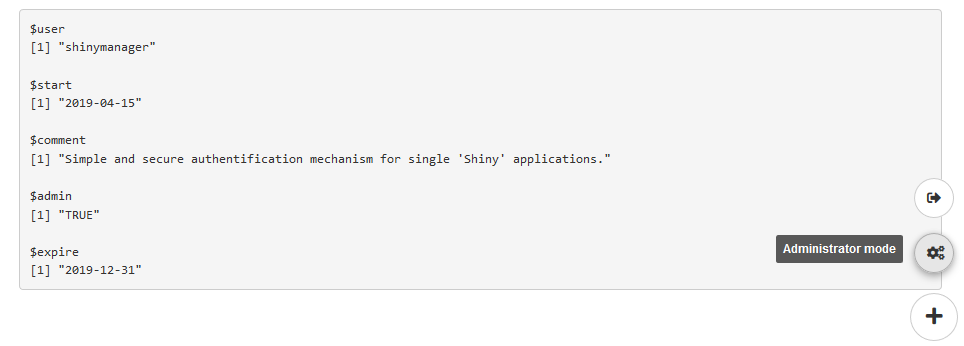
Once logged in, the application will be launched and a button added to navigate between the app and the admin panel (SQL credentials only and if user is authorized to access it), and to logout from the application:
Store your credentials data in Sqlite database protected with a
symmetric AES encryption from openssl, and password hashing
using scrypt:
?create_db# Init DB using credentials data
credentials <- data.frame(
user = c("shiny", "shinymanager"),
password = c("azerty", "12345"),
# password will automatically be hashed
admin = c(FALSE, TRUE),
stringsAsFactors = FALSE
)
# you can use keyring package to set database key
library(keyring)
key_set("R-shinymanager-key", "obiwankenobi")
# Init the database
create_db(
credentials_data = credentials,
sqlite_path = "path/to/database.sqlite", # will be created
passphrase = key_get("R-shinymanager-key", "obiwankenobi")
# passphrase = "passphrase_wihtout_keyring"
)
# Wrap your UI with secure_app, enabled admin mode or not
ui <- secure_app(ui, enable_admin = TRUE)
server <- function(input, output, session) {
# check_credentials directly on sqlite db
res_auth <- secure_server(
check_credentials = check_credentials(
"path/to/database.sqlite",
passphrase = key_get("R-shinymanager-key", "obiwankenobi")
# passphrase = "passphrase_wihtout_keyring"
)
)
output$auth_output <- renderPrint({
reactiveValuesToList(res_auth)
})
# your classic server logic
...
}Store your credentials data in your SQL database using the
DBI interface (and always password hashing using
scrypt):
?create_sql_dbTemplate available here: https://github.com/datastorm-open/shinymanager/tree/master/inst/sql_config
library(shiny)
library(shinymanager)

#### init the SQL Database
# first edit the .yml configuration file
system.file("sql_config/pg_template.yml", package = "shinymanager")


# Init Credentials data
credentials <- data.frame(
  user = c("shiny", "shinymanager"),
  password = c("azerty", "12345"), # password will automatically be hashed
  stringsAsFactors = FALSE
)

# Create SQL database
create_sql_db(
  credentials_data = credentials,
  config_path = "path/to/your_sql_configuration.yml"
)

### Use in shiny
ui <- fluidPage(
  tags$h2("My secure application"),
  verbatimTextOutput("auth_output")
)

# Wrap your UI with secure_app
ui <- secure_app(ui, choose_language = TRUE)


server <- function(input, output, session) {

 # call the server part
 # check_credentials returns a function to authenticate users
 res_auth <- secure_server(
   check_credentials = check_credentials(db = "path/to/your_sql_configuration.yml")
 )

 # your classic server logic

}

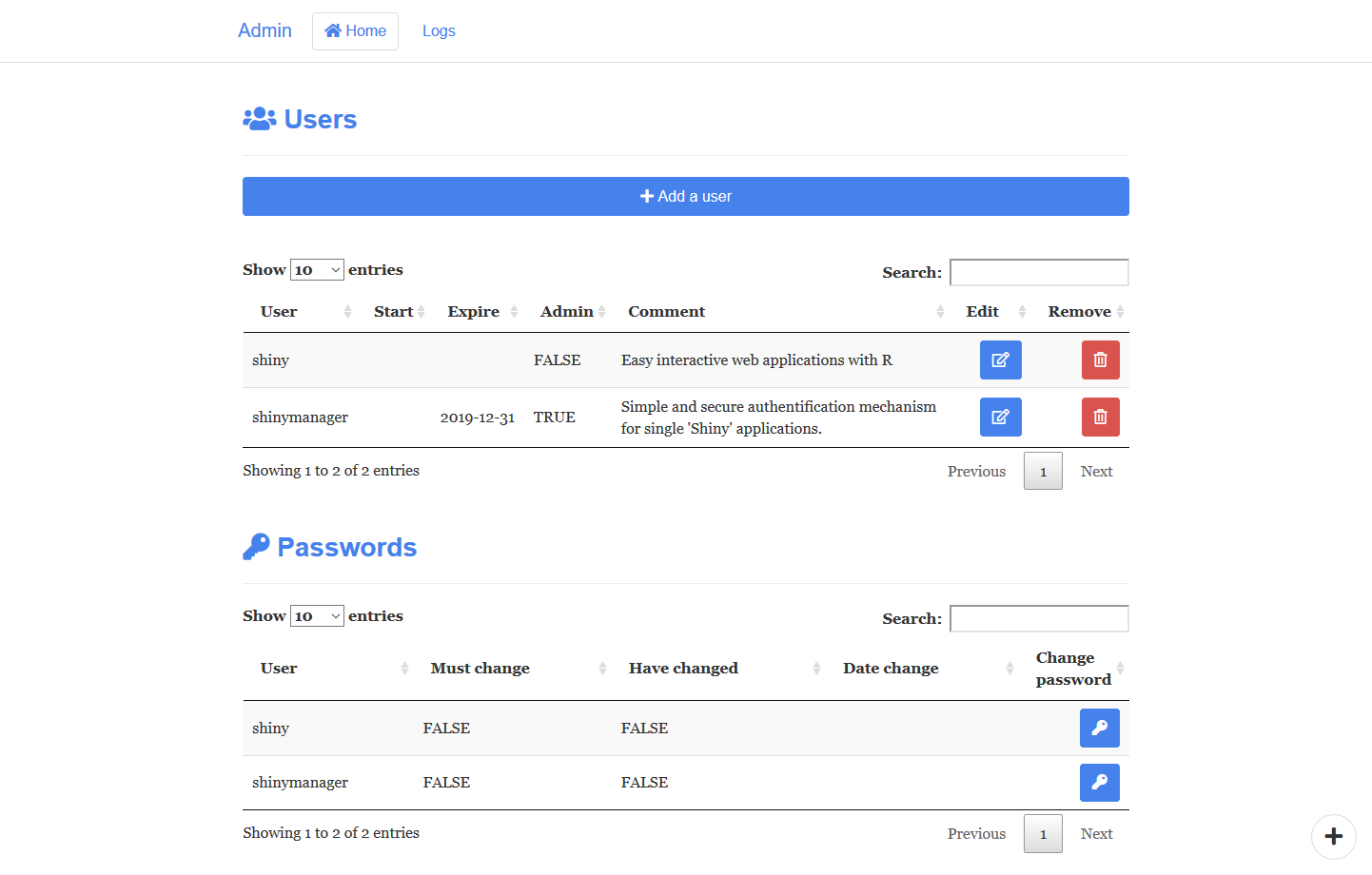
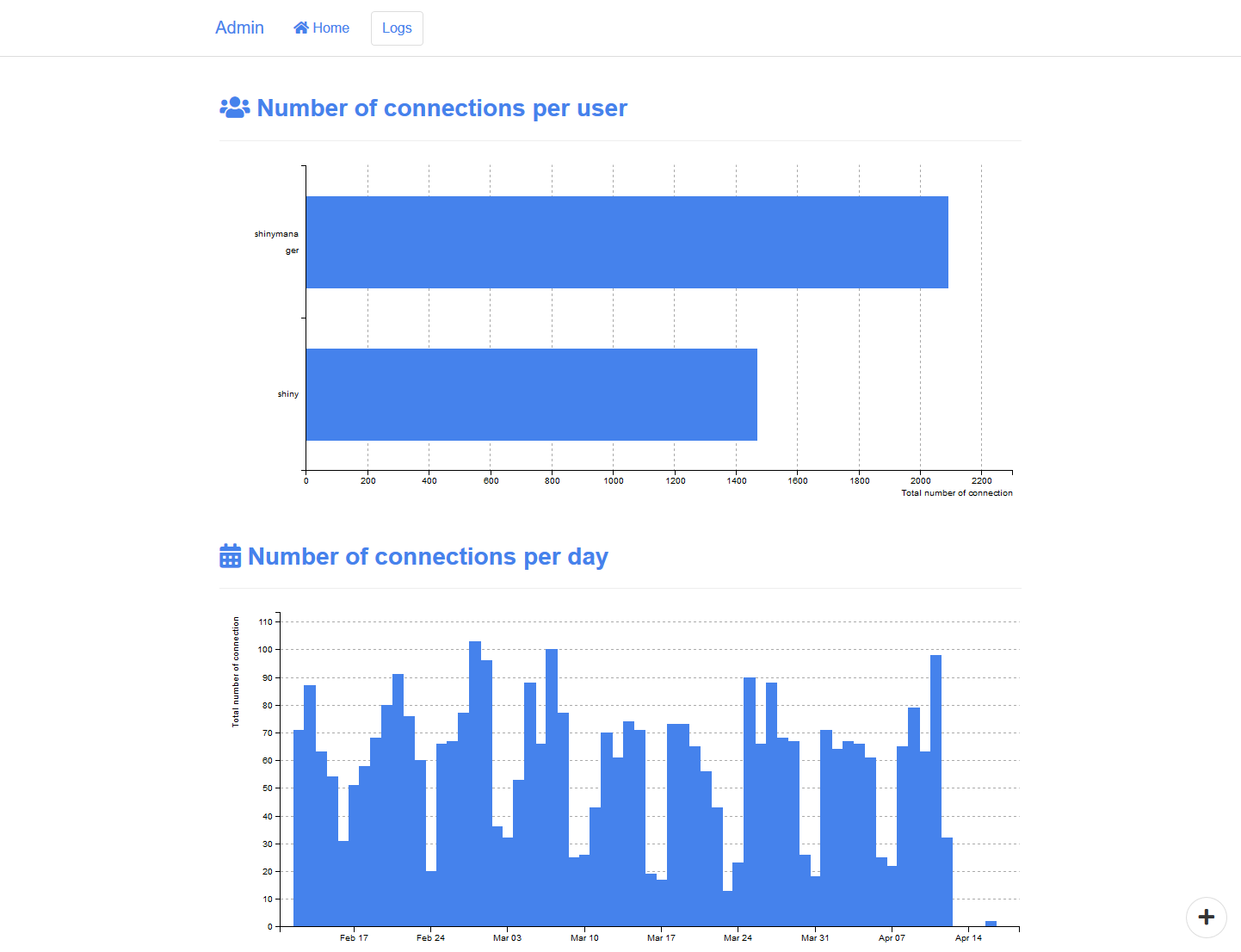
shinyApp(ui, server)Using SQL/Sqlite database protected, an admin mode is available to manage access to the application, features included are

You can also use your own authentication function with
check_credentials, for example doing a control to your
intern database. check_credentials must be a function with
two arguments user & password, returning a
list with at least result (TRUE
to authorize access, or FALSE) and user_info
(all you want to retrieve from the user in the app):
require(RPostgreSQL)
library(shiny)
library(shinymanager)
library(DBI)
library(glue)

dbname = "*****"
host = "localhost"
port = *****
user = "*****"
password = "******"

con <- dbConnect(dbDriver("PostgreSQL"), dbname = dbname , host = host, port = port ,
                 user = user, password = password )


DBI::dbWriteTable(con, "my_table", data.frame(
  user = c("test"),
  password = c("123"),
  stringsAsFactors = FALSE
))

# or a config .yml file or others arguments
my_custom_check_creds <- function(dbname, host, port, db_user, db_password) {

 # finally one function of user and password
  function(user, password) {

    con <- dbConnect(dbDriver("PostgreSQL"), dbname = dbname,
                     host = host, port = port,
                     user = db_user, password = db_password)

    on.exit(dbDisconnect(con))

    req <- glue_sql("SELECT * FROM my_table WHERE \"user\" = ({user}) AND \"password\" = ({password})",
             user = user, password = password, .con = con
    )

    req <- dbSendQuery(con, req)
    res <- dbFetch(req)
    if (nrow(res) > 0) {
      list(result = TRUE, user_info = list(user = user, something = 123))
    } else {
      list(result = FALSE)
    }
  }
}

ui <- fluidPage(
  tags$h2("My secure application"),
  verbatimTextOutput("auth_output")
)
ui <- secure_app(ui)


server <- function(input, output, session) {
  res_auth <- secure_server(
    check_credentials = my_custom_check_creds(
      dbname = "******",
      host = "*****",
      port = ****,
      db_user = "*****",
      db_password = "*******"
    )
  )
  auth_output <- reactive({
    reactiveValuesToList(res_auth)
  })

  # access info
  observe({
    print(auth_output())
  })
}

shinyApp(ui, server)Two inputs are created:
observe({
    print(input$shinymanager_where)
    print(input$shinymanager_language)
})You can customize the module (css, image, language, …).
?secure_app
?auth_ui
?set_labels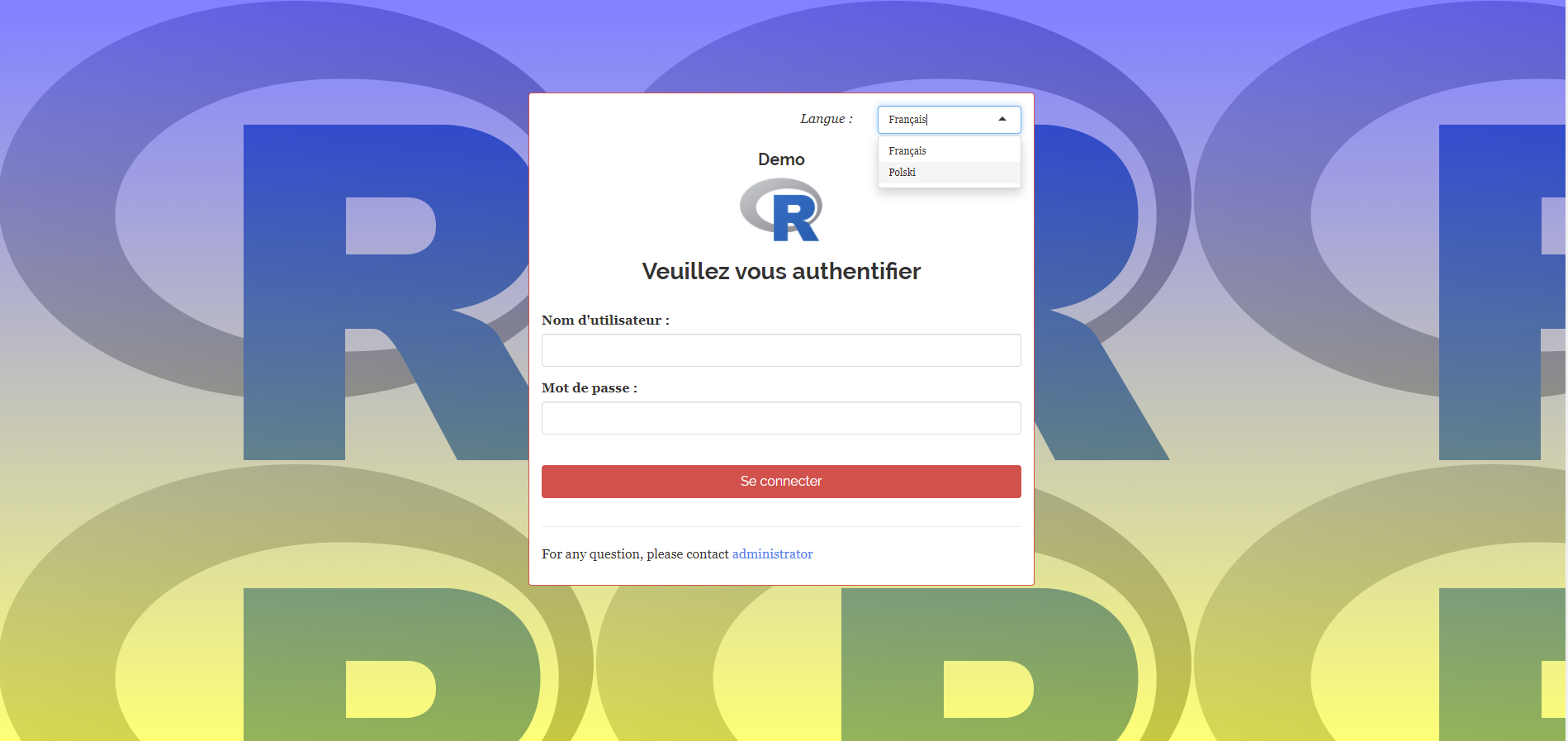
It’s possible to use shinymanager authentication on
flexdashboard (but not admin console at moment). You can
find information on this
discussion. But it’s not a really secure way because user can
overpass the authentication using developper console… Prefer use
shiny application with secure_app
function.
There’s no persistent data storage on shinyapps.io, you
can read more here: https://docs.rstudio.com/shinyapps.io/Storage.html.
So your sqlite database is lost when the instance is
closed, and the one you’ve pushed when deploying the application will be
used. You have to use external database.
The application works fine without shinymanager but not
you have trouble using shinymanager.
There is a lag between your ui and the
server, since shinymanger hides the
ui part until authentication is successful. It is therefore
possible that some of `ui element`` (input) are not defined and are
NULL. In this case, you’ll see some warning / error message in your R
console.
So we recommend to use in all your reactive/observer functions the
req instruction to validate the
inputs.
One more global and brutal solution can be:
server <- function(input, output, session) {

  auth_out <- secure_server(....)

  observe({
    if(is.null(input$shinymanager_where) || (!is.null(input$shinymanager_where) && input$shinymanager_where %in% "application")){

      # your server app code
    }
  })
}
But it’s better to use req solution. More discussion on
https://github.com/datastorm-open/shinymanager/issues/36
shinymanager use http request and sha256 tokens to grant
access to the application, like this the source code is protected
without having the need to change your UI or server code.
The credentials database is secured with a pass phrase and the openssl
package. Hashed password using scrypt. If
you have concern about method we use, please fill an issue.
Package shinyauthr
provides a nice shiny module to add an authentication layer to your
shiny apps.