

GetTDDataInformation regarding prices and yields of bonds issued by the Brazilian government can be downloaded from the official open data portal at Tesouro Transparente. However, aggregating all of this historical data into a structured format can be challenging.
Package GetTDData makes importing data from Tesouro
Direto simple and fast. All you need to download bond data is the asset
identifier (LFT, LTN, NTN-C, NTN-B, NTN-B Principal, NTN-F, NTN-B1,
Educa+, RendA+). Function td_get2() downloads directly from
the official Tesouro Transparente CKAN open data repository.
# from CRAN (stable version)
install.package('GetTDData')

# from github (development version)
devtools::install_github('msperlin/GetTDData')Suppose you need financial data (prices and yields) for a bond of type LTN with a maturity (end of contract) at 2023-01-01. This bullet bond is the most basic debt contract the Brazilian government issues. It does not pay any coupon during its lifetime and pays R$ 1,000 at maturity.
In order to get the data, all you need to do is run the following
code in R using td_get2():
library(GetTDData)

assets <- 'LTN'   # Identifier of assets
first_year <- 2020
last_year <- 2022

df_td <- td_get2(assets,
                 first_year,
                 last_year)
#>
#> ── Downloading TD data from Tesouro Transparente CKAN
#>
#> ── Reading TD data
#> ✔ Retrieved 3644 rows of TD data.
Let’s plot the prices to check if the code worked:
library(ggplot2)
library(dplyr)
#>
#> Attaching package: 'dplyr'
#> The following objects are masked from 'package:stats':
#>
#>     filter, lag
#> The following objects are masked from 'package:base':
#>
#>     intersect, setdiff, setequal, union

# filter  LTN
my_asset_code <- "LTN 010123"

LTN <- df_td %>%
  filter(asset_code  ==  my_asset_code)

p <- ggplot(data = LTN,
            aes(x = as.Date(ref_date),
                y = price_bid,
                color = asset_code)) +
  geom_line(linewidth = 1) + scale_x_date() + labs(title = '', x = 'Dates')

print(p)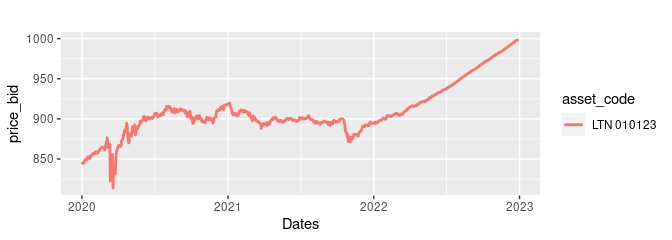
The latest version of GetTDData offers function
get_yield_curve to download the current Brazilian yield
curve directly from Anbima. The yield curve is a tool of financial
analysts that show, based on current prices of fixed income instruments,
how the market perceives the future real, nominal and inflation
returns.
df_yield <- get_yield_curve()
str(df_yield)
#> tibble [103 × 5] (S3: tbl_df/tbl/data.frame)
#>  $ n_biz_days  : num [1:103] 252 252 252 378 378 378 504 504 504 630 ...
#>  $ type        : chr [1:103] "real_return" "nominal_return" "implicit_inflation" "real_return" ...
#>  $ value       : num [1:103] 6.27 12.89 6.23 6.64 12.77 ...
#>  $ ref_date    : Date[1:103], format: "2027-10-26" "2027-10-26" ...
#>  $ current_date: Date[1:103], format: "2026-10-22" "2026-10-22" ...
And we can plot it for the desired result:
library(ggplot2)

p <- ggplot(df_yield, aes(x=ref_date, y = value) ) +
  geom_line(size=1) + geom_point() + facet_grid(~type, scales = 'free') +
  labs(title = paste0('The current Brazilian Yield Curve '),
       subtitle = paste0('Date: ', df_yield$current_date[1]))
#> Warning: Using `size` aesthetic for lines was deprecated in ggplot2 3.4.0.
#> ℹ Please use `linewidth` instead.
#> This warning is displayed once per session.
#> Call `lifecycle::last_lifecycle_warnings()` to see where this warning was
#> generated.

print(p)